AI Agent Frameworks Compared 2026: LangGraph vs CrewAI vs OpenAI SDK
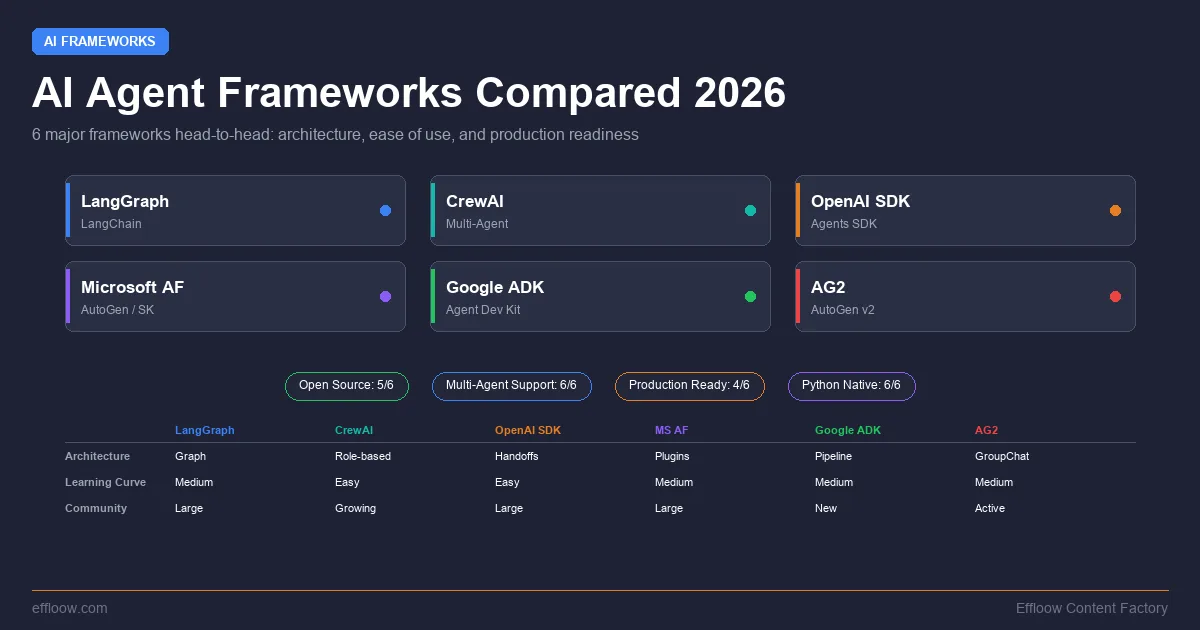
Building AI agents is no longer the hard part. Choosing the right framework to build them with — that is where most teams lose weeks.
The landscape shifted dramatically between late 2025 and early 2026. Microsoft merged Semantic Kernel and AutoGen into a single Agent Framework. OpenAI graduated its experimental Swarm project into a production-ready Agents SDK. Google shipped ADK across four languages. LangGraph hit 1.0 and then 1.1. CrewAI reported crossing 2 billion agentic executions. And the original AutoGen community forked into AG2, now positioning itself as a universal agent runtime.
Every framework promises multi-agent orchestration, tool use, and memory. The differences are in the details: how you define agent coordination, what happens when things fail, how much control you get over execution flow, and how painful it is to move from prototype to production.
The "what happens when things fail" part is the one most framework comparisons skip, and it is not a framework property alone — the model underneath has to notice the fault in the first place. We sent three synthetic tool faults drawn from the ToolMisuseBench fault catalog (schema drift, rate limiting, and an error message dressed up as success) to a live OpenAI model and recorded how it reacted, in our ToolMisuseBench recovery reproduction. Read it alongside whatever retry and checkpointing story your chosen framework offers.
This guide compares the six frameworks that matter most right now. No fabricated benchmarks. No synthetic scores. Just architecture, trade-offs, code patterns, and honest recommendations based on what each framework actually does well.
If you are building with these frameworks to create coding agents specifically, see our comparison of terminal AI coding agents in 2026 and our rundown of the best AI coding agents.
Quick Comparison Table
Before diving into each framework, here is how they compare across the dimensions that matter most for production agent systems:
| Framework | Primary Language | Multi-Agent | Orchestration Style | State Management | MCP Support | License |
|---|---|---|---|---|---|---|
| LangGraph | Python, TypeScript | Yes | Graph-based (explicit) | Checkpointing, durable execution | Yes | MIT |
| CrewAI | Python | Yes | Role-based crews + event-driven flows | Session state in flows | Yes | MIT |
| OpenAI Agents SDK | Python, TypeScript | Yes | Handoffs + agents-as-tools | Sessions (built-in) | Yes | MIT |
| Microsoft Agent Framework | Python, C#/.NET | Yes | Workflows + chat patterns | Session-based, checkpointing | Yes | MIT |
| Google ADK | Python, Java, Go, TypeScript | Yes | Workflow agents + LLM routing | Session-based | Yes | Apache 2.0 |
| AG2 | Python | Yes | GroupChat + event-driven | Stateful runtime | Yes | Apache 2.0 |
LangGraph (by LangChain)
LangGraph is the agent orchestration layer built on top of LangChain. While LangChain provides the building blocks — model abstractions, tool definitions, retrieval chains — LangGraph adds the execution graph that determines how agents coordinate, retry, and persist state. If the retrieval layer is what you actually need first, LlamaIndex is the more focused choice — see our LlamaIndex RAG tutorial.
Architecture
LangGraph models agent workflows as directed graphs. Nodes are functions (often wrapping LLM calls or tool executions). Edges define transitions between nodes, and conditional edges let you route execution based on the current state. This is explicit orchestration: you draw the flow, and LangGraph executes it.
from langgraph.graph import StateGraph, START, END
from typing import TypedDict

class AgentState(TypedDict):
    messages: list
    next_agent: str

graph = StateGraph(AgentState)
graph.add_node("researcher", research_node)
graph.add_node("writer", writer_node)
graph.add_node("reviewer", reviewer_node)

graph.add_edge(START, "researcher")
graph.add_conditional_edges(
    "researcher",
    route_after_research,
    {"needs_writing": "writer", "done": END}
)
graph.add_edge("writer", "reviewer")
graph.add_conditional_edges(
    "reviewer",
    route_after_review,
    {"approved": END, "revision_needed": "writer"}
)

app = graph.compile()
What LangGraph Does Well
Durable execution. LangGraph persists agent state at every node transition. If a process crashes midway through a ten-step workflow, it resumes from the last checkpoint — not from scratch. This matters for long-running agents that interact with external systems.
Human-in-the-loop. The interrupt mechanism lets you pause execution at any node, present the state to a human, collect input, and resume. This is built into the graph execution model, not bolted on.
Visibility. The graph structure makes it straightforward to visualize and debug agent workflows. You can see exactly which node executed, what state was passed, and where things diverged.
Type safety (v1.1). The March 2026 v1.1 release added type-safe streaming and invoke with Pydantic model coercion, catching state shape errors at development time rather than production.
Where LangGraph Falls Short
Verbosity. Simple agent patterns require significantly more code in LangGraph than in frameworks designed for rapid prototyping. A two-agent handoff that takes 15 lines in OpenAI Agents SDK can take 50+ lines in LangGraph.
LangChain coupling. While you can use LangGraph without the full LangChain stack, the documentation and ecosystem strongly assume you are using LangChain's model abstractions, prompt templates, and tool definitions. Breaking away from that path requires more effort than the docs suggest.
Learning curve. Thinking in graphs is not natural for developers coming from imperative programming. The mental model of state flowing through nodes with conditional edges takes time to internalize.
Best For
Teams building production agent systems where reliability, observability, and fine-grained control over execution flow are the primary concerns. Particularly strong for workflows that need durable execution and human oversight — compliance workflows, multi-step data pipelines, and enterprise automation. For a hands-on multi-agent walkthrough in code, see our multi-agent Python tutorial with the OpenAI Agents SDK.
CrewAI
CrewAI takes a different approach: instead of graphs, you think in terms of crews — teams of role-playing AI agents that collaborate on tasks. The mental model is closer to how human teams work: you define agents with roles, assign them tasks, and let the framework handle coordination.
Architecture
CrewAI has two layers. Crews are teams of autonomous agents that can delegate to each other and make dynamic decisions. Flows are the enterprise orchestration layer — event-driven workflows that can contain Crews as steps, with explicit state management and conditional branching.
from crewai import Agent, Task, Crew, Process

researcher = Agent(
    role="Senior Research Analyst",
    goal="Find comprehensive data on AI framework adoption",
    backstory="You are an expert at analyzing technology trends...",
    tools=[web_search, arxiv_search],
    llm="anthropic/claude-sonnet-4-6"
)

writer = Agent(
    role="Technical Writer",
    goal="Create clear, accurate technical comparisons",
    backstory="You specialize in developer-facing content...",
    llm="anthropic/claude-sonnet-4-6"
)

research_task = Task(
    description="Research the top AI agent frameworks...",
    expected_output="A structured report with findings",
    agent=researcher
)

writing_task = Task(
    description="Write a comparison article based on research",
    expected_output="A polished article draft",
    agent=writer,
    context=[research_task]
)

crew = Crew(
    agents=[researcher, writer],
    tasks=[research_task, writing_task],
    process=Process.sequential
)

result = crew.kickoff()
What CrewAI Does Well
Speed to prototype. CrewAI has the fastest time-to-working-demo of any framework in this comparison. The role-based abstraction is intuitive — you describe what each agent does, and the framework handles the coordination plumbing.
Task delegation. Agents can autonomously decide to delegate subtasks to other agents in the crew. This emergent collaboration is useful for complex research and analysis workflows where the optimal task decomposition is not known in advance.
NVIDIA integration. The 2026 NemoClaw partnership adds infrastructure-level policy enforcement for enterprise deployments — rate limiting, content filtering, and audit logging at the framework level.
Adoption. CrewAI reports over 2 billion agentic executions and adoption across a large share of the Fortune 500, backed by a big community and an extensive ecosystem of pre-built tools and integrations. Those are the vendor's own figures, so read them as adoption signal rather than an independent benchmark.
Where CrewAI Falls Short
Limited control over execution. The role-playing abstraction that makes CrewAI fast to prototype can become a liability in production. When agents make autonomous delegation decisions, the execution path becomes less predictable. Debugging why an agent delegated a task incorrectly is harder than tracing a graph edge.
Python only. No official TypeScript or JavaScript SDK. If your stack is Node.js-based, CrewAI is not an option without running a Python service alongside your application.
Flows complexity. The Flows layer adds enterprise-grade control but introduces a second mental model on top of Crews. Teams often end up needing both, which increases the cognitive overhead.
Best For
Teams that want to prototype multi-agent workflows quickly and value intuitive abstractions over fine-grained control. Strong fit for research pipelines, content generation workflows, and analysis tasks where agent autonomy is a feature rather than a risk. Our CrewAI multi-agent tutorial walks through building a complete system from scratch.
OpenAI Agents SDK
The OpenAI Agents SDK is the production evolution of the experimental Swarm framework. It takes a deliberately minimalist approach: three core primitives — agents, handoffs, and guardrails — composed using plain Python.
Architecture
Agents SDK is built around the idea that agent orchestration should feel like writing normal Python code. Agents are objects with instructions and tools. Handoffs transfer control between agents. Guardrails validate inputs and outputs. Everything else is just Python.
from agents import Agent, Runner, handoff, tool

@tool
def search_docs(query: str) -> str:
    """Search internal documentation."""
    return doc_store.search(query)

@tool
def execute_sql(query: str) -> str:
    """Run a read-only SQL query."""
    return db.execute_readonly(query)

triage_agent = Agent(
    name="Triage",
    instructions="Route the user to the right specialist agent.",
    handoffs=[
        handoff(docs_agent, "Questions about documentation"),
        handoff(data_agent, "Questions about data or metrics"),
    ]
)

docs_agent = Agent(
    name="Docs Specialist",
    instructions="Answer questions using internal documentation.",
    tools=[search_docs]
)

data_agent = Agent(
    name="Data Analyst",
    instructions="Answer data questions using SQL.",
    tools=[execute_sql]
)

result = Runner.run(triage_agent, "What were our Q1 conversion rates?")
What OpenAI Agents SDK Does Well
Simplicity. The three-primitive model (agents, handoffs, guardrails) is the simplest mental model in this comparison. There are no graphs to draw, no roles to define, no workflow engines to configure. You compose agents with Python.
Tool integration. Any Python function becomes a tool with the @tool decorator. Schema generation and Pydantic validation are automatic. MCP server integration is built in.
Tracing. Built-in tracing for every agent run — visualize handoff chains, tool calls, and guardrail checks. The traces feed directly into OpenAI's evaluation and fine-tuning tools.
Guardrails. Input and output validation is a first-class concept, not an afterthought. You can define guardrails that reject, modify, or flag agent inputs and outputs before they reach the user.
Where OpenAI Agents SDK Falls Short
OpenAI-centric. While technically model-agnostic (you can plug in other providers), the SDK is optimized for OpenAI models. Tracing, evaluation, and fine-tuning tools all assume the OpenAI ecosystem. Using it with Anthropic or open-source models means losing some of the tighter integrations.
Limited orchestration patterns. The handoff model is elegant for linear delegation chains but becomes awkward for complex multi-agent patterns like parallel execution, voting, or iterative refinement loops. You end up building those patterns yourself in Python.
No durable execution. Unlike LangGraph, there is no built-in checkpointing or crash recovery. If a long-running agent process dies, you restart from the beginning. The Sessions feature adds persistence within a run but does not survive process crashes.
Best For
Teams that value simplicity and are building within the OpenAI ecosystem. Excellent for customer-facing agent applications where the triage-and-handoff pattern dominates — support bots, internal tools, and conversational agents that route to specialists. See our OpenAI Agents SDK multi-agent tutorial for a working example.
Microsoft Agent Framework
Microsoft Agent Framework is the result of merging Semantic Kernel and AutoGen into a single SDK. It combines Semantic Kernel's enterprise features — type safety, middleware, telemetry, extensive model support — with AutoGen's multi-agent conversation patterns.
Architecture
The framework offers two primary orchestration patterns. Chat-based patterns (inherited from AutoGen) put multiple agents in a conversation where a selector determines who speaks next. Workflows (inherited from Semantic Kernel) provide explicit, typed execution paths with checkpointing and human-in-the-loop support.
// C# example — Microsoft Agent Framework
using Microsoft.AgentFramework;

var researcher = new ChatCompletionAgent
{
    Name = "Researcher",
    Instructions = "Research topics thoroughly using available tools.",
    Kernel = kernel,
    Tools = [searchTool, webScrapeTool]
};

var analyst = new ChatCompletionAgent
{
    Name = "Analyst",
    Instructions = "Analyze research findings and produce insights.",
    Kernel = kernel
};

var groupChat = new GroupChat([researcher, analyst])
{
    SelectionStrategy = new RoundRobinSelectionStrategy(),
    TerminationStrategy = new MaxMessageTerminationStrategy(10)
};

await foreach (var message in groupChat.InvokeAsync())
{
    Console.WriteLine($"{message.AuthorName}: {message.Content}");
}
What Microsoft Agent Framework Does Well
Enterprise integration. Deep integration with Azure, Microsoft 365, and the broader Microsoft ecosystem. If your organization runs on Azure, the deployment story is seamless — Azure AI Foundry, Cosmos DB for state, Application Insights for telemetry.
C#/.NET first-class support. The only major framework in this comparison with production-quality C#/.NET support. Python support is at parity for GA features, but the C# experience is where the framework shines.
Typed workflows. The workflow system provides compile-time type checking for agent state, catching errors that other frameworks only surface at runtime.
Checkpointing. Long-running workflows can checkpoint state and resume after process restarts, similar to LangGraph's durable execution but with tighter integration into Azure's persistence layer.
Where Microsoft Agent Framework Falls Short
Complexity from merger. The merge of Semantic Kernel and AutoGen happened quickly, and while the framework reached 1.0 GA in February 2026, some teams report that the two lineages still surface as overlapping patterns and APIs. Chat patterns, workflows, or a hybrid? The decision tree for choosing the right approach is not always clear.
Migration overhead. Teams already using Semantic Kernel or AutoGen face a migration path that is well-documented but non-trivial. The mental models are similar but the APIs differ enough to require real engineering time.
Best For
Teams building enterprise agent systems in the Microsoft/Azure ecosystem, especially those using C#/.NET. Strong fit for organizations that need deep integration with Microsoft 365, Azure AI services, and enterprise identity/compliance infrastructure.
Google ADK (Agent Development Kit)
Google ADK is the newest entrant, designed to make agent development feel like software development. It reached 1.0 across Python, TypeScript, Java, and Go in 2026 — the broadest language support of any framework.
Architecture
ADK uses a tree-based agent hierarchy. A root agent delegates to sub-agents, which can be either LLM-powered agents or workflow agents (Sequential, Parallel, Loop). The framework supports both explicit workflow orchestration and LLM-driven dynamic routing.
from google.adk import Agent, SequentialAgent, ParallelAgent

research_agent = Agent(
    name="researcher",
    model="gemini-2.5-pro",
    instruction="Research the given topic thoroughly.",
    tools=[google_search, url_context]
)

fact_check_agent = Agent(
    name="fact_checker",
    model="gemini-2.5-pro",
    instruction="Verify claims against authoritative sources.",
    tools=[google_search]
)

writing_agent = Agent(
    name="writer",
    model="gemini-2.5-pro",
    instruction="Write a clear, accurate article from verified research.",
)

pipeline = SequentialAgent(
    name="content_pipeline",
    sub_agents=[
        ParallelAgent(
            name="research_phase",
            sub_agents=[research_agent, fact_check_agent]
        ),
        writing_agent
    ]
)
What Google ADK Does Well
Language breadth. Python, TypeScript, Java, and Go — all at 1.0. No other framework covers this range. Java and Go support opens the door for backend teams that would otherwise be excluded from the agent framework ecosystem.
Workflow agents as primitives. Sequential, Parallel, and Loop agents are first-class constructs, not library utilities. Composing them into complex workflows is natural and type-safe.
Deployment flexibility. Agents can run locally, deploy to Vertex AI Agent Engine for managed scaling, or containerize with Docker/Cloud Run. The same agent definition works across all deployment targets.
Built-in tools. Google Maps, URL context fetching, code execution (container-based and Vertex AI-based) — practical tools that other frameworks leave to third-party integrations.
Where Google ADK Falls Short
Google ecosystem bias. While officially model-agnostic, ADK is optimized for Gemini. Using non-Google models requires more configuration and loses some of the tighter integrations (evaluation, deployment to Agent Engine).
Newer ecosystem. The community and third-party tooling are smaller than LangGraph or CrewAI. Finding solutions to edge cases often means reading source code rather than Stack Overflow answers.
Documentation gaps. As a 1.0 framework across four languages, the documentation is comprehensive for Python but thinner for Java, Go, and TypeScript.
Best For
Teams that need multi-language support (especially Java or Go), are building on Google Cloud, or want a structured approach to agent orchestration with explicit workflow primitives. Good fit for organizations with polyglot backend teams.
AG2 (Formerly AutoGen)
AG2 is the community-driven fork of Microsoft's original AutoGen, led by the original creators after they departed Microsoft in late 2024. While Microsoft took AutoGen's ideas into Agent Framework, AG2 rearchitected the core with an event-driven, async-first design.
Architecture
AG2's primary coordination pattern is GroupChat: multiple agents in a shared conversation where a selector (round-robin, LLM-based, or custom) determines who speaks next. The framework also supports direct agent-to-agent messaging and nested conversations.
from ag2 import ConversableAgent, GroupChat, GroupChatManager

coder = ConversableAgent(
    name="Coder",
    system_message="Write clean Python code to solve problems.",
    llm_config=llm_config
)

reviewer = ConversableAgent(
    name="Reviewer",
    system_message="Review code for bugs and improvements.",
    llm_config=llm_config
)

executor = ConversableAgent(
    name="Executor",
    system_message="Execute code and report results.",
    code_execution_config={"work_dir": "workspace"}
)

group_chat = GroupChat(
    agents=[coder, reviewer, executor],
    messages=[],
    max_round=10,
    speaker_selection_method="auto"
)

manager = GroupChatManager(groupchat=group_chat, llm_config=llm_config)
coder.initiate_chat(manager, message="Build a web scraper for...")
What AG2 Does Well
Framework interoperability. AG2's standout feature is its ability to connect agents from different frameworks — AG2, Google ADK, OpenAI, and LangChain agents — into a single team. This is valuable for organizations that have already invested in multiple frameworks.
Conversational patterns. The GroupChat model is natural for problems that benefit from multi-perspective discussion — code review, brainstorming, and iterative refinement. Agents genuinely build on each other's outputs in ways that pipeline architectures cannot replicate.
Code execution. Built-in sandboxed code execution with Docker support. Agents can write, execute, and iterate on code within the conversation flow.
Community-driven. Rapid iteration without enterprise bureaucracy. New features and integrations ship faster than in corporate-backed alternatives.
Where AG2 Falls Short
Enterprise readiness. AG2 lacks the enterprise features (compliance, audit logging, managed deployment) that Microsoft moved into Agent Framework. Organizations with strict compliance requirements may find gaps.
Conversation management. GroupChat conversations can become long and expensive as agents discuss back and forth. Token costs scale with conversation length, and managing context windows across many agents requires careful configuration.
Branding confusion. The AutoGen/AG2/Microsoft Agent Framework split creates confusion. Documentation from 2024-2025 may reference APIs that exist in neither the current AG2 nor the Microsoft fork.
Best For
Teams doing research, rapid experimentation, or building systems that need to combine agents from multiple frameworks. Strong fit for code generation workflows where iterative discussion between agents (write, review, execute, refine) produces better results than single-pass pipelines.
How to Choose: Decision Framework
The right framework depends on your constraints, not on which one is "best" in the abstract. Use these questions to narrow down:
What language does your team use?
- C#/.NET → Microsoft Agent Framework (only serious option)
- Java or Go → Google ADK (only option with 1.0 support)
- Python → All six frameworks are available
- TypeScript → LangGraph, OpenAI Agents SDK, or Google ADK
How much control do you need over execution?
- Maximum control → LangGraph (explicit graphs, durable execution)
- Moderate control → Google ADK (workflow agents) or Microsoft Agent Framework (typed workflows)
- Minimal control / maximum speed → CrewAI (role-based) or OpenAI Agents SDK (handoffs)
What is your cloud platform?
- Azure → Microsoft Agent Framework (deep integration)
- Google Cloud → Google ADK (Vertex AI Agent Engine)
- AWS or cloud-agnostic → LangGraph, CrewAI, or OpenAI Agents SDK
What orchestration pattern fits your use case?
- Linear delegation (triage → specialist) → OpenAI Agents SDK
- Explicit multi-step pipelines → LangGraph or Google ADK
- Autonomous team collaboration → CrewAI
- Multi-perspective discussion → AG2
- Enterprise workflows with checkpointing → LangGraph or Microsoft Agent Framework
Do you need to combine multiple frameworks?
- Yes → AG2 (universal agent interoperability)
- No → Choose the best single framework for your constraints
When to skip an agent framework entirely
Not every problem needs one of these. Reach for a framework only when the coordination itself is the hard part. Skip it when:
- Your task is a single LLM call with one or two tools. A plain SDK call plus a function wrapper is less code, fewer dependencies, and easier to debug than a graph or a crew. Frameworks earn their weight at three or more coordinated steps, not at one.
- The work is a fixed pipeline with no branching. If step A always feeds step B with no runtime routing, a short script beats an orchestration layer that exists to make branching manageable.
- Governance and audit are the real requirement. If you need to assign work, enforce policy, and keep an audit trail across many agents, that is an orchestration-platform concern, not a code-library one. We describe that split in the "What We Use at Effloow" section below.
The failure mode to avoid is adopting a framework for the label rather than the coordination problem. A one-agent task wrapped in a multi-agent framework carries all the abstraction cost and none of the benefit.
Framework Maturity and Ecosystem
Understanding where each framework sits in its lifecycle helps set expectations. Star counts move daily and reveal little about production fitness, so the more useful signals are release maturity and how the vendor positions the project. Check the linked repository for the current version and adoption before you commit:
| Framework | First Release | Release Maturity | License | Repository |
|---|---|---|---|---|
| LangGraph | Jan 2024 | 1.x stable | MIT | langchain-ai/langgraph |
| CrewAI | Nov 2023 | 1.x stable | MIT | crewAIInc/crewAI |
| OpenAI Agents SDK | Mar 2025 | Production, pre-1.0 | MIT | openai/openai-agents-python |
| Microsoft Agent Framework | Oct 2025 | 1.0 GA | MIT | microsoft/agent-framework |
| Google ADK | Apr 2025 | 1.0 GA | Apache 2.0 | google/adk-python |
| AG2 | Late 2024 | Production, pre-1.0 | Apache 2.0 | ag2ai/ag2 |
A pre-1.0 label here (OpenAI Agents SDK, AG2) is not a warning — both vendors describe their SDK as production-ready — but it does mean the public API can still change between minor releases, so pin your version.
MCP Support Across Frameworks
Model Context Protocol (MCP) has become the standard for connecting agents to external tools and data sources. All six frameworks now support MCP, but the depth of integration varies. For a worked example of how tool access changes an agent's behavior in practice, see our proof run on agentic web search and context control.
- LangGraph: MCP tools integrate as standard LangChain tools via the MCP adapter. Full support for both stdio and Streamable HTTP transports.
- CrewAI: MCP server tools can be assigned to agents alongside native CrewAI tools.
- OpenAI Agents SDK: Built-in MCP server tool integration — declare MCP servers in agent configuration and tools are automatically discovered.
- Microsoft Agent Framework: MCP is a first-class feature — MCPStdioTool and MCPStreamableHTTPTool connect to MCP servers natively, and agents can themselves be exposed as MCP servers.
- Google ADK: MCP tool integration available across all language SDKs.
- AG2: MCP support via the interoperability layer.
What We Use at Effloow
At Effloow, our agent infrastructure uses a different approach entirely — we adopted Paperclip, a governance-first agent orchestration platform, to coordinate our AI agents through a task-based system rather than a framework-based one. This is a fundamentally different architecture from any of the frameworks compared above: instead of agents calling other agents through code, a control plane assigns work, manages state, and enforces policies.
We mention this not as a recommendation but for transparency. The frameworks in this guide are the right tools when you are building agent logic in application code. Paperclip solves a different problem — orchestrating agents as workers in a company-like structure.
Conclusion
The AI agent framework landscape in 2026 is mature enough that there is no wrong choice among the top options — only choices that fit your constraints better or worse.
If you are starting fresh with Python and want maximum control, LangGraph is the most battle-tested option. If you want to move fast and value intuitive abstractions, CrewAI gets you to a working prototype fastest. If simplicity is your priority and you are in the OpenAI ecosystem, the Agents SDK is hard to beat. If your team is C#/.NET or deep in Azure, Microsoft Agent Framework is the clear choice now that it has reached GA. If you need multi-language support, Google ADK is the only framework that covers Python, TypeScript, Java, and Go at 1.0. And if you need to stitch together agents from multiple frameworks, AG2 is uniquely positioned for that.
The one thing that does not work: choosing a framework based on hype or GitHub stars alone. Match the framework to your team's language, your cloud platform, your orchestration needs, and the level of control you need. Everything else is noise.
For more on the AI tools and agents we cover, see our comparison of Cursor, Windsurf, and GitHub Copilot, our guide to the best AI code review tools, and our guide to what vibe coding actually means.
What Effloow Added
Each of these six frameworks has its own docs that explain it in isolation. None tells you which one to pick. The added value here is the cross-framework decision:
- A single comparison axis across all six — orchestration model, language support, license, and MCP support — with each framework's repository linked so the claims are checkable, not asserted.
- A constraint-driven decision framework that maps a real situation (your language, your cloud, your control needs) to a specific framework, instead of declaring a single winner.
- An explicit skip test — when a plain SDK call, a fixed script, or a governance platform is the better answer than any framework here.
- No star-count theater. We deliberately left GitHub stars out of the maturity table, because they move daily and say nothing about production fitness; release maturity and license are the signals that actually inform a build decision.
The value is the side-by-side judgment with sources attached, not six feature lists reprinted.
Get the next one
in your inbox.
One short weekly dispatch with new guides, tools, and what we tested. No spam, unsubscribe anytime.
Get weekly AI tool reviews & automation tips
Join our newsletter. No spam, unsubscribe anytime.
More in Articles
Effloow Lab ran 17 OpenAI API calls. Appending, deleting, reordering or rewording a single tool zeroed the prompt cache every time. One setting avoided it.
Step-by-step guide to self-hosting RAGFlow v0.25 with Docker Compose — deep document understanding, chunking strategies, MCP server, and the Python SDK.
We deployed LangGraph with a Postgres checkpointer in our lab, reproduced the silent re-execution trap on long tool calls, and documented the exact gotchas, workarounds, and cost math for production agent deployments.
Agent while-loops lose state on every crash, timeout, and rate limit. How durable execution with Inngest AgentKit or Temporal fixes it, with code blueprints.