Microsoft Fabric MCP: Build AI Agents Over Enterprise Data
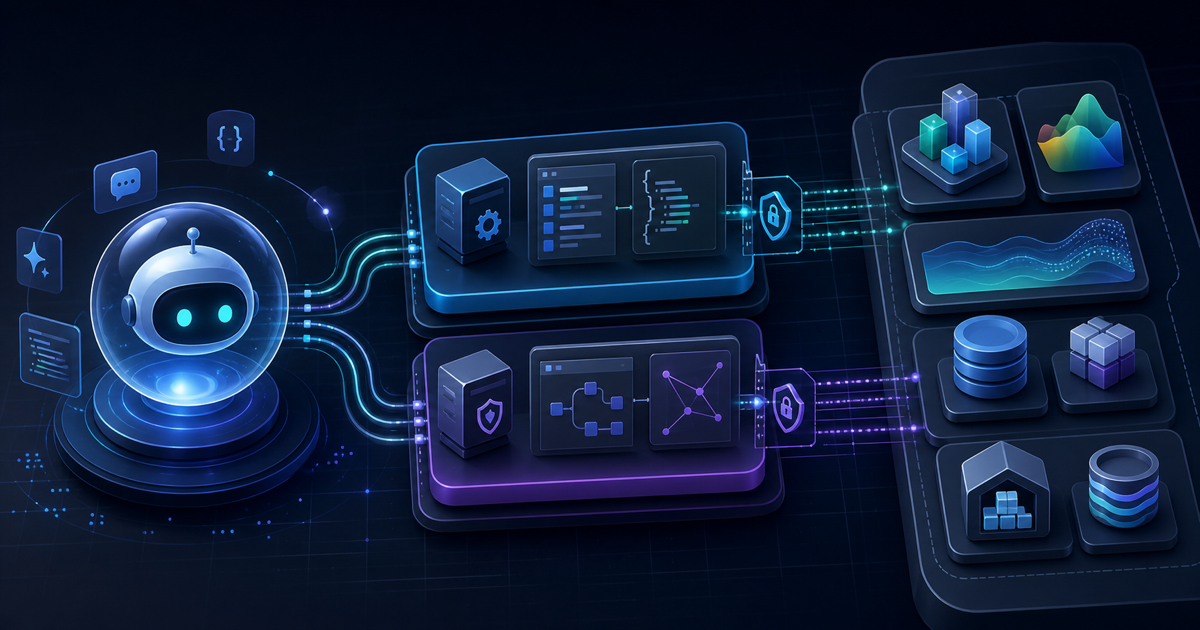
If you've been following the Model Context Protocol ecosystem, you already know the pattern: give your AI agent a typed tool interface to an external system, and stop re-implementing connectors every sprint. Microsoft took that idea seriously in early 2026 and applied it to Fabric — one of the most data-dense enterprise platforms on the market.
The result is a layered MCP architecture with two distinct servers and a clear division of responsibility. This guide covers both, how to get started with the generally available pieces, and when to reach for each layer.
Two Servers, Two Jobs
Before diving into setup, the most important thing to understand is why Microsoft split this into two separate servers instead of one.
Local MCP (Pro-Dev) runs on your machine as a subprocess. It exposes Fabric's full OpenAPI specifications, JSON schemas for every item type, and built-in guidance for pagination and error handling. Its audience is developers writing code against Fabric APIs — it gives your AI coding assistant (GitHub Copilot, Cursor, Claude) the context it needs to generate correct, production-ready Fabric code without hallucinating endpoints or parameter names.
Remote Core MCP is a cloud-hosted endpoint. It executes real operations inside your Fabric environment — creating workspaces, managing permissions, deploying item definitions, reading and writing data. It authenticates through Microsoft Entra ID and operates under your existing RBAC boundaries. Every invocation is recorded in Fabric's standard audit logs.
The split is intentional: Local MCP is about knowledge and code generation; Remote MCP is about execution with enterprise guardrails. A CI/CD pipeline and an individual developer may use both in the same workflow — Local to generate code, Remote to deploy it.
There's also a third MCP surface for real-time data: the Eventhouse Remote MCP for Real-Time Intelligence workloads, which handles KQL queries and streaming data. More on that below.
Local MCP: Generally Available
Effloow Lab inspected the installation surface for the Local MCP server from Microsoft Learn documentation (see data/lab-runs/microsoft-fabric-mcp-enterprise-data-agents-2026.md). The npm package is real, published, and documented with quickstart instructions.
Install and Run
# No global install needed — npx pulls latest
npx -y @microsoft/fabric-mcp@latest server start --mode all
Or install globally:
npm install -g fabric-pro-dev-mcp-server
The --mode all flag starts the server with all available tool groups enabled: API documentation, OneLake file operations, and item definition management.
VS Code Configuration
Add this to .vscode/mcp.json in your project:
{
  "servers": {
    "fabric-mcp": {
      "type": "stdio",
      "command": "npx",
      "args": [
        "-y",
        "@microsoft/fabric-mcp@latest",
        "server start",
        "--mode",
        "all"
      ]
    }
  }
}
Once the server is running, switch GitHub Copilot into Agent Mode in VS Code. The agent can now ask questions like "which Fabric API endpoint creates a Lakehouse?" and get grounded answers from the actual OpenAPI spec — not a model hallucination.
The Local MCP works with VS Code + GitHub Copilot, Cursor, Claude Desktop, and any other MCP-compatible client.
What the Local MCP Exposes
The tool set covers:
- Full OpenAPI spec for Fabric's public REST APIs (item CRUD, workspace management, deployment pipelines)
- JSON schemas for Lakehouse, Warehouse, Notebook, Semantic Model, Real-Time Analytics items, and more
- OneLake file operations: upload, download, table inspection, item creation
- Best-practice guidance embedded as context: pagination patterns, error handling, rate limits
The practical result is that you can tell Copilot "create a new Fabric Notebook in my workspace and push this Python script to it" and the agent generates correct API calls instead of guessing parameter names.
OneLake MCP: Also Generally Available
OneLake MCP is a separate GA release announced in April 2026. It focuses specifically on the storage layer — the OneLake unified data lake that sits under all Fabric workloads.
npx @microsoft/fabric-mcp
The GA release added:
- Integrated authentication (Entra ID, no manual token wrangling)
- Automatic retry on transient failures
- Production-grade SLAs
- Telemetry for debugging and observability
With OneLake MCP, an agent can browse the lake structure, read delta tables, and move data between local and remote storage — all through natural language instructions in the chat interface. The unified architecture means the same lake backs Lakehouses, Warehouses, and Eventhouses, so an agent querying through OneLake MCP sees data across workloads.
Remote Core MCP: Cloud-Hosted Preview
The Core Remote MCP is a cloud-hosted endpoint that runs in Microsoft's infrastructure. No local process, no subprocess management — you configure a URL and an authentication method, and any MCP-compatible agent can connect.
Endpoint: https://api.fabric.microsoft.com/v1/mcp
Authentication: Microsoft Entra ID (OAuth 2.0). Your existing organizational account and its Fabric role assignments apply immediately.
What It Can Do
The Core MCP exposes Fabric's operational APIs as typed MCP tools:
- Create and manage workspaces
- Deploy item definitions (Lakehouses, Warehouses, Notebooks, Pipelines)
- Manage permissions and role assignments
- Read and update item metadata
Every operation goes through the standard Fabric API and produces standard audit log entries. Agents operate with the signed-in user's permissions — no elevation, no bypass. An agent can't delete a workspace if the authenticated user doesn't have that permission.
Connecting from VS Code
{
  "servers": {
    "fabric-core-remote": {
      "type": "http",
      "url": "https://api.fabric.microsoft.com/v1/mcp",
      "auth": {
        "type": "entra"
      }
    }
  }
}
The same JSON works with Cursor and Claude Desktop (which supports HTTP MCP servers). You authenticate once through the browser and the token refreshes automatically.
The Remote Core MCP was announced at FabCon in March 2026 and is currently in preview. Documentation is available on Microsoft Learn, though the endpoint was still rolling out to all tenants at the time of writing. Check your Fabric admin portal to confirm availability.
- No local installation — any MCP client connects with a URL
- Full Entra ID + RBAC enforcement, no shadow permissions
- Audit trail identical to portal/API operations
- Works in multi-agent pipelines without per-node credentials
- Preview status — GA timeline not yet announced
- Tenant rollout still in progress as of May 2026
- Requires Microsoft Entra ID (no service principal key auth yet in preview)
- Tool surface covers core Fabric operations; specialty workloads (Power BI Premium, Purview) are not yet included
Eventhouse MCP: Real-Time Intelligence Layer
The Eventhouse Remote MCP is a separate server specifically for Fabric's Real-Time Intelligence workload. It is hosted as an endpoint per Eventhouse instance, not as a single global endpoint.
GitHub repo: microsoft/fabric-rti-mcp
The Eventhouse MCP exposes:
- Natural language to KQL query translation
- Dynamic schema and metadata discovery (tables, columns, types)
- Historical and real-time data querying
- Eventstream and KQL Database operations
Setup requires your Eventhouse endpoint URL:
{
  "servers": {
    "eventhouse-mcp": {
      "type": "http",
      "url": "https://<your-cluster>.z9.kusto.fabric.microsoft.com/<database>/mcp",
      "auth": {
        "type": "entra"
      }
    }
  }
}
An agent connected to the Eventhouse MCP can answer questions like "what's the 99th percentile latency for API requests in the last hour?" by translating the question to KQL, executing it, and returning the result — all within the same conversation.
This is a meaningful shift for on-call engineers and data analysts who currently write KQL by hand or rely on dashboards. An agent with Eventhouse MCP access can investigate anomalies, filter by dimension, and aggregate across time windows in response to natural language questions.
Data Agents as MCP Servers
There's a fourth surface worth knowing: Fabric Data Agents can themselves be published as MCP servers.
Fabric Data Agents are natural-language interfaces over governed data sources: Warehouse, Lakehouse, Eventhouse (KQL), Semantic Model (Power BI), and Azure AI Search. You build a Data Agent in the Fabric portal — configuring which sources it can access and what questions it's scoped to answer — and then expose it as an MCP endpoint.
This means you can compose them: an orchestrating agent in Claude Desktop or Copilot Studio calls a Fabric Data Agent MCP server as one of its tools, alongside other MCP servers (GitHub, Slack, Notion). The Data Agent handles the data questions; the orchestrator handles everything else.
Setting up a Data Agent MCP server is currently in preview. From the Fabric portal, navigate to your Data Agent item, enable "Expose as MCP Server," and copy the generated endpoint URL. The URL follows this pattern:
https://api.fabric.microsoft.com/v1/workspaces/{workspaceId}/items/{agentId}/mcp
Row-level security from the underlying data sources is enforced at query time — the agent can't return rows the authenticated user isn't allowed to see.
Choosing the Right Layer
| Use Case | Local Pro-Dev MCP | Remote Core MCP | Eventhouse MCP | Data Agent MCP |
|---|---|---|---|---|
| Code generation against Fabric APIs | ✓ Best fit | — | — | — |
| Deploy items / manage workspaces | — | ✓ Best fit | — | — |
| Query real-time / streaming data (KQL) | — | — | ✓ Best fit | — |
| NL queries over governed business data | — | — | — | ✓ Best fit |
| OneLake file / delta table operations | ✓ Included | — | — | — |
| Enterprise multi-agent pipelines | Combine | Combine | Combine | Compose |
A typical agentic workflow looks like this: a developer agent uses Local MCP to understand the API and generate deployment code. A CI/CD agent uses Remote Core MCP to execute the deployment. An operations agent uses Eventhouse MCP to monitor the result. A business analyst's agent queries the Data Agent MCP to surface KPIs. All four run as separate agents, none needs to know the internal details of the others.
Connecting to Claude Desktop
Claude Desktop supports HTTP-based MCP servers. Add the Remote Core MCP or Eventhouse MCP to your Claude Desktop configuration:
{
  "mcpServers": {
    "fabric-core": {
      "url": "https://api.fabric.microsoft.com/v1/mcp",
      "transport": "http-sse",
      "auth": {
        "type": "oauth",
        "provider": "entra"
      }
    }
  }
}
For the Local MCP (stdio transport):
{
  "mcpServers": {
    "fabric-local": {
      "command": "npx",
      "args": ["-y", "@microsoft/fabric-mcp@latest", "server", "start", "--mode", "all"]
    }
  }
}
After restart, Claude Desktop's tool use will show Fabric tools in the available set.
What This Changes for Data Teams
The framing in Microsoft's own blog post is "turning your data platform into an AI-native operating system." That's a reasonable characterization. What MCP does for Fabric is the same thing it does for any platform: it eliminates the need for custom connectors and gives any MCP-compatible agent immediate, typed access to the platform's capabilities.
The enterprise-specific benefit is that access control doesn't change. Agents inherit the permissions of the authenticated user. A junior analyst's agent can't read a confidential table that the analyst can't read directly. Audit logs capture what the agent did with the same fidelity as what the analyst does in the portal. Security and compliance teams don't need to audit a new access path — it's the same one.
For developers, the Local MCP removes a class of hallucination errors in Fabric-related code generation. Agents generating Fabric REST calls from memory get parameters wrong. Agents grounded in the actual OpenAPI spec don't.
FAQ
Is the Local MCP free?
The Local MCP itself is open source (available on GitHub). Fabric workspace operations consume your existing Fabric capacity units. Running npx @microsoft/fabric-mcp incurs no additional Microsoft cost beyond your Fabric subscription.
Does Remote Core MCP work with non-Microsoft AI clients?
Yes. Any MCP-compatible client that supports HTTP transport can connect — Cursor, Claude Desktop, custom agent frameworks. The server is standard MCP over HTTP, not Microsoft-proprietary.
Is Data Agent MCP the same as Copilot for Fabric?
No. Copilot for Fabric is a Microsoft-hosted assistant embedded in the Fabric UI. Data Agent MCP lets you expose a Fabric Data Agent as a tool endpoint that any external MCP client can call. The two can complement each other but serve different audiences.
When will Remote Core MCP reach GA?
Microsoft has not announced a GA timeline as of May 2026. The preview was announced at FabCon in March 2026. Watch the Fabric monthly feature summary blog for updates.
Can I use Fabric MCP with LangGraph or AutoGen?
Yes, if the framework supports calling MCP servers. LangGraph's MCP tool adapter and AutoGen's MCPTool class both support HTTP MCP servers. Point them at the Remote Core MCP endpoint the same way you'd point Claude Desktop.
Key Takeaways
Microsoft Fabric's MCP layer is one of the more complete enterprise data integrations in the MCP ecosystem right now. Two GA releases (Local Pro-Dev MCP and OneLake MCP) are available today, with real npm packages and documented quickstarts. The Remote Core MCP and Eventhouse MCP are in preview but have real endpoints and documented authentication flows.
The design decision to separate Local (code generation + knowledge) from Remote (execution + audited operations) reflects a mature approach to enterprise security. Agents get broad knowledge from the Local server and narrowly scoped, permission-respecting execution from the Remote server. The audit trail doesn't change — every operation is still a standard Fabric API call.
If your team runs on Fabric and is building or evaluating agentic workflows, Local MCP is the right starting point: install via npx, configure in VS Code, and let your coding assistant generate grounded Fabric API calls. Remote Core MCP is worth prototyping for deployment automation as soon as it reaches GA in your tenant.
Microsoft Fabric MCP gives AI agents controlled, audited access to one of the most data-dense enterprise platforms available — with two GA releases today and a cloud-hosted Remote MCP in preview. If you work with Fabric, Local MCP is worth adding to your developer toolchain this week; it's a one-line npx command that immediately improves the quality of Fabric-related code your AI assistant generates.
Need content like this
for your blog?
We run AI-powered technical blogs. Start with a free 3-article pilot.