OpenAI Spend Limits Return 429: Your Retry Logic Will Make It Worse
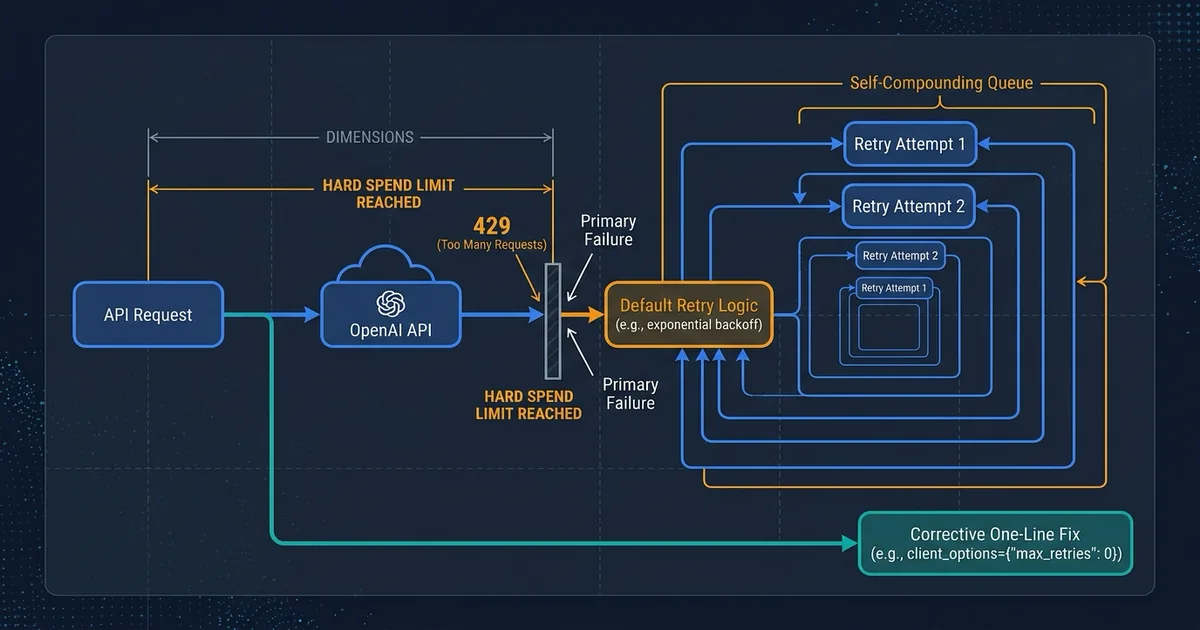
You set a monthly ceiling on your AI bill so a runaway job can't hand you a five-figure invoice. Sensible. Finance likes it. Then on a Tuesday afternoon your product stops answering customers and nobody can say why, because the dashboards show the API "responding" and the error logs are full of a message that reads like ordinary traffic congestion.
That's the failure mode worth understanding this week. OpenAI began expanding hard spend limits to all API Platform accounts in late July 2026. It's a genuinely useful control. It also opens a specific, quiet path by which a cost safeguard turns into a customer-facing outage, and the reason has less to do with OpenAI than with what the software on your side does the moment the cap trips.
We ran the check. Here's what actually happens.
The cap and the throttle look identical from the outside
Two unrelated situations produce the same rejection.
The first is ordinary congestion. You sent requests faster than your account tier allows, so some get bounced. Wait a moment, send again, it works. Temporary by design, and every client library is built to ride it out.
The second is your budget cap. Once tracked spend crosses the hard limit you configured, OpenAI's documentation is explicit: "Affected API requests return a 429 error with the insufficient_quota code." That one is not temporary. It clears when a human raises the limit, adds funds, or the billing month rolls over. Retrying accomplishes nothing.
Both arrive as the same HTTP status code, 429. If you've ever written or copied a line resembling "on 429, back off and try again," you've written code that answers a permanent budget stop with patient, polite, futile waiting.
What we ran
Effloow Lab built a small harness rather than guessing.
We stood up a fake OpenAI endpoint on a local machine that always rejects requests with a 429, then pointed the official OpenAI Python library at it. That let us serve the budget-cap rejection and the congestion rejection on demand, count how many network requests each one really produced, and time them. No OpenAI traffic, no cost, and no risk of disabling a live account by deliberately tripping a real cap.
Then we made two tiny live calls to OpenAI itself, roughly thirty tokens each, to see what warning signals a healthy response actually carries. Commands and raw output live in the public lab note.
What happened
One call quietly became three. The library retries on its own, twice, by default. A single request from your application produced three separate hits on the endpoint before giving up. Identical behavior for the budget-cap rejection and the congestion rejection. The library does not distinguish them.
Your code catches the same object either way. Both surfaced as the library's RateLimitError. Same class, same status code. Any handler written around "is this a rate limit error" will treat a hard billing stop as a traffic hiccup, because as far as the type system is concerned, it is one.
The wasted wait is real but small per call. The budget-cap case burned about a second and a half (1.56s) across its three attempts before failing. That's time spent on an outcome that could never improve. The congestion case took about two seconds (2.01s), but that gap is an artifact of our own test server, which set a retry-after: 1 header on the congestion body and none on the budget one. It says nothing about how OpenAI paces the two. The number that matters is the first one: roughly 1.5 seconds, per call, spent waiting for a wall to move.
One usable difference does exist. The rejection body carries an error code, and it differs: insufficient_quota for the budget stop, rate_limit_exceeded for congestion. It's readable from the exception in a single expression. Nothing in the default setup reads it.
Then the live calls turned up something we weren't looking for.
The newer endpoint told us nothing about our limits. OpenAI's rate-limit documentation describes six headers that let a client watch how close it is to the ceiling, things like remaining requests and remaining tokens. On a successful call to the Responses API, the newer interface OpenAI is steering everyone toward, our account received none of them. Only a request ID came back. Same account, same model, same minute, called through the older Chat Completions endpoint: all six.
We're not claiming this is universal. It's one account on one afternoon, and header behavior can vary by tier and change without notice. But if it holds for you, the early-warning channel a lot of monitoring code depends on is simply absent on the endpoint you're being migrated onto. You find out at failure time or not at all. If you're mid-migration, our Assistants API to Responses port notes cover the surrounding changes.
One caution about the discriminator
insufficient_quota does not exclusively mean "someone set a cap and you hit it." The same code has long signaled an exhausted prepaid balance, which is why the familiar "you exceeded your current quota, please check your plan and billing details" message carries it too.
That's fine for the branch, and arguably better. Both conditions are terminal, neither is fixed by waiting, and both need a human in billing rather than a backoff timer. Just don't wire the alert text to say "spend limit reached" when what you actually know is "OpenAI is refusing on money grounds." Name the class of problem, not a specific cause you haven't confirmed. An on-call engineer chasing a cap that was never configured burns the same hour as one chasing a traffic spike.
What it costs you in ordinary terms
Nothing here is dramatic on a single request. A second and a half of pointless waiting is invisible. The problem is multiplication.
Three requests per call is the library's own behavior, underneath whatever your application does. If your service wraps calls in its own retry loop, the counts compound: an application-level policy of five attempts becomes fifteen network requests against a cap that will reject all fifteen. That's arithmetic on our measured figure of 3, not a separate measurement. It's also arithmetic your infrastructure performs on your behalf, whether or not anyone chose it.
The first thing you notice is latency. Requests that would have failed instantly now sit for seconds, pushing queues, worker pools, and upstream HTTP calls past their own deadlines. A billing stop starts looking like a general slowdown.
Diagnosis is where the real money goes. The logs say "rate limit." Engineers spend the first hour investigating traffic spikes, because that's what the message describes. The actual fix is one person changing a number in a billing dashboard, and it sits nowhere near the top of the list.
Worst of all, the cap fails at its own purpose. A spend limit is supposed to produce a clean, obvious stop. If your system instead degrades into slow, ambiguous errors, you paid for a safeguard and received an incident.
Can this survive your workflow?
Ask it against the places where an AI call sits inside something that has to finish.
Order and payment flows. If a checkout step calls a model to classify, validate, or summarize, a budget cap that presents as a slow error piles up half-finished transactions instead of failing them cleanly. You want the fast, unambiguous rejection.
Support ticket handling. Automated triage that stalls for seconds per message, then errors with a misleading reason, quietly builds a backlog nobody notices until the queue-depth alarms fire.
CRM and internal data writes. Background jobs are the worst case. They retry on a schedule on top of the library's retries, and nobody watches them closely. A cap tripped on Friday evening can spend the weekend generating rejected traffic.
Billing and reporting runs. Month-end batch work tends to coincide with the month's peak spend, which is exactly when a monthly cap trips. That timing isn't bad luck. It's the design.
If any of those describes your service, the useful next step is a short audit of how your client is configured and how your error handling branches. We do that kind of bounded, evidence-backed review through Proof Studio, and you can tell us what you're running if you'd rather have the check done against your own stack than a generic checklist.
What to change this week
Three things, in order, and the first one takes about ten minutes.
- Branch on the error code, not the status code. Find every handler that catches a 429 and read
error.codebefore deciding to retry.insufficient_quotaexits immediately and pages billing. Everything else keeps its backoff. - Set your client's retry count and timeout explicitly. Don't inherit them. Two retries and a ten-minute default timeout are reasonable library choices that are wrong inside a web request with a two-second budget.
- Add a spend alert well below the hard limit, and check what your capacity monitoring reads. If it depends on
x-ratelimit-*headers, verify those headers still arrive on the endpoints you actually call.
When to use hard spend limits, and when to skip them
Use them when an uncapped bill is the larger risk. Prototypes, experiments, agent loops that could run away, projects handed to contractors, anything where a bug could multiply spend overnight. The cap is doing real work there, and a hard stop is what you want.
Use them on customer-facing systems too, but fix the handling first. The cap is still correct. It just needs your code to recognize the stop and surface it as a billing condition rather than swallow it as congestion.
Skip the hard limit and use spend alerts instead when the service must not stop and someone is genuinely watching notifications. OpenAI's own guidance points this way: alerts notify without enforcing, and they stay active alongside a hard limit. The documentation also notes that enforcement "is not instantaneous, so recorded spend can slightly exceed the configured amount," which means a hard cap isn't a precise financial instrument either. It's a circuit breaker.
One more distinction worth keeping straight. The limit you configure is separate from the monthly usage allowance OpenAI assigns your organization by tier. Two ceilings, both real, and only one of them is yours to change from a settings page. If you route through a gateway rather than calling OpenAI directly, the enforcement layer moves and so does the failure shape, which we measured separately in our OpenRouter spend-governance run.
What we could not test
We did not trip a real hard spend limit. Doing so would have disabled API access for the account, and the cost of that experiment outweighed its value, since the rejection shape is documented. The budget-cap responses in our harness reproduce the documented structure and were served locally. They are not captured OpenAI responses, and we'd rather say so than imply otherwise.
The timing difference between our two cases came from headers our own server set. Treat the 1.56s figure as "roughly a second and a half of wasted wait per call under library defaults," not as a measurement of OpenAI's pacing.
Retry counts and timings belong to one specific library version. Other languages, gateways, and hand-rolled HTTP clients will differ, sometimes substantially.
The missing-headers observation is a single account, a single model, a single moment. Verify it in your own environment rather than treating it as settled fact about the platform.
A hard spend limit is worth having, but under default client settings it fails slowly and lies about why. Read error.code on every 429 you catch. It's one line, and it's the difference between a clean stop and an incident review.
What Effloow added
The vendor documentation tells you a hard limit returns a 429 with insufficient_quota. The library documentation tells you 429 is retried by default. Both statements are accurate, both are public, and neither one puts them next to each other.
Our contribution is the measurement of what happens when they meet: three network requests per call, an identical exception class for two unrelated conditions, and a working discriminator that costs one line to read. Plus the endpoint-comparison finding, which we ran into by accident and which is the part we'd most want to know if we were the ones operating the service.
For your engineers
Environment. macOS, Python 3.12.8, openai Python SDK 2.37.0. Live calls used model gpt-5.5-2026-04-23 through a budget-guarded harness (scripts/proof_budget.py), 29 tokens per call, 58 for the run.
Retry harness result. A local http.server returning 429 on every POST, SDK pointed at it via base_url:
| Response body | HTTP requests per SDK call | Wall clock | Exception raised |
|---|---|---|---|
insufficient_quota | 3 | 1.56s | RateLimitError |
rate_limit_exceeded (+ retry-after: 1) | 3 | 2.01s | RateLimitError |
insufficient_quota, max_retries=0 | 1 | ~0.00s | RateLimitError |
Request offsets for the congestion case were 0.002s / 1.01s / 2.013s, tracking the retry-after: 1 our fake server set. Without that header the SDK used its own backoff: 0.35s / 0.78s / 1.562s. The two wall-clock figures are therefore not comparable as OpenAI behavior. They compare "with a retry-after hint" against "without one."
Discriminator fields, read from the exception with max_retries=0:
| Field | Spend limit | Rate limit |
|---|---|---|
type(e).__name__ |
RateLimitError |
RateLimitError |
e.status_code |
429 |
429 |
e.code |
insufficient_quota |
rate_limit_exceeded |
e.type |
insufficient_quota |
requests |
The branch. e.code is the field to read. Fail fast and alert billing; do not feed it into backoff.
import openai

client = openai.OpenAI(max_retries=2, timeout=20.0)

try:
    resp = client.responses.create(model="gpt-5.5", input=user_input)
except openai.RateLimitError as e:
    if e.code == "insufficient_quota":
        # Spend cap OR exhausted balance. Terminal either way; retrying cannot fix it.
        raise BillingStopError("OpenAI refused on billing grounds") from e
    raise  # genuine throttling: let your backoff policy handle it
Two configuration notes. The SDK retries 429 alongside connection errors, 408, 409, and 5xx, twice by default, per the openai-python README. And the default request timeout is 10 minutes, long enough that a stalled call inside a web request will blow past your own deadlines well before the SDK gives up. Set both explicitly, as above.
Live header capture, same account and model, minutes apart:
| Endpoint | x-ratelimit-* headers on HTTP 200 |
|---|---|
/v1/responses |
none observed (only x-request-id) |
/v1/chat/completions |
all six (limit- / remaining- / reset- for requests and tokens) |
If your capacity monitoring reads those headers, verify it still works after a Responses API migration. Related reading on keeping call costs measurable: token optimization for production LLM workloads and our tool-failure recovery cost proof.
Reproduce it. Commands, raw JSON output, and the full limitations list are in the lab note.
Q: Does a 429 from a spend limit ever clear on its own?
Only when the underlying billing state changes: someone raises the limit, adds credit, or the billing period rolls over. No backoff duration resolves it. That's why treating it as retryable isn't merely wasteful. It's wrong.
Q: Should I just set max_retries=0?
No. Genuine throughput throttling is real and worth retrying. Keep the retries and branch on e.code, so the budget stop exits immediately while congestion still gets its backoff.
Q: How do I get an early warning before the cap trips?
Spend alerts, configured well below the hard limit, are the mechanism OpenAI provides, and they keep working after you add a cap. Don't rely on rate-limit response headers as a budget warning. They describe throughput, not spend, and in our single-account check they were absent from the Responses API entirely.
Primary sources. OpenAI spend limits guide · OpenAI rate limits guide · openai-python README, Retries · OpenAI Cookbook: how to handle rate limits · Hard spend limits rollout announcement
Sell an AI tool with a claim like this?
We run your tool's claim in a sandbox and hand you proof assets your buyers can check — recorded runs, failures included, and a sales-ready claim table.
More in Articles
Claude's Managed Agents budget documents that it can land past its own cap. The production architecture that actually bounds an autonomous agent's bill.
We asked the live OpenAI API which model answers when you write gpt-5. It is the exact snapshot being deleted on December 11, 2026.
The Videos API and every sora-2 model shut down 2026-09-24 with an empty replacement column. The inventory scan and exit matrix to decide before the date.
Why AI products bleed money on frontier models, and the three-layer architecture (pruning, caching, hybrid routing) that fixes cost without killing quality.