Multi-Tenant LLM Gateway: Enforcing Virtual Key Budgets & Quotas
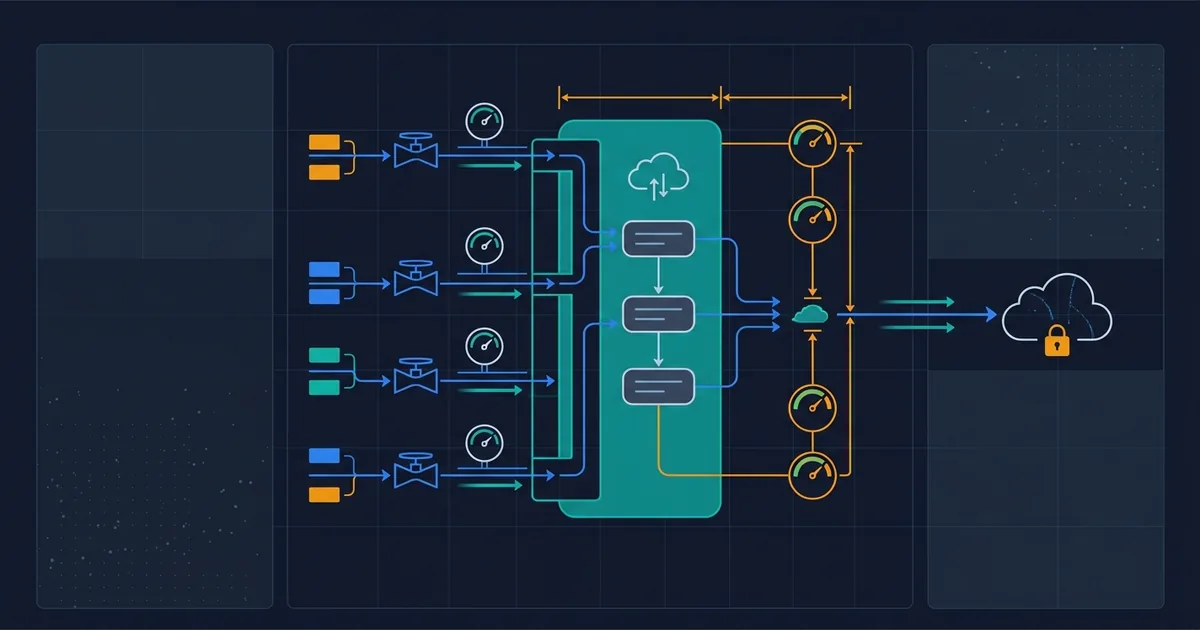
If your SaaS product has an AI feature, somewhere in your backend there is probably one provider API key that every customer's traffic flows through. That single key is a business decision you may not remember making: it means every customer shares one bill, one rate limit, and one blast radius. When any tenant's usage spikes (a genuine power user, an integration bug, a scripted abuser), the invoice is yours, the rate-limit errors hit everyone, and you have no per-customer number to point at.
This guide is the production blueprint for fixing that: a gateway layer that issues each customer a virtual key with its own hard budget, its own rate limit, and its own metered spend. We build it on LiteLLM Proxy, the open-source gateway we have covered before at the single-tenant level; this article is about what changes when the tenants are paying customers and the caps have to actually hold.
The Real Business Bottleneck: One Key, Shared Fate
For a founder shipping AI features to business customers, the missing per-tenant boundary shows up as three distinct problems.
Cost has no owner. The provider bills your account, not your customers. Without per-tenant metering you cannot answer the questions that decide pricing: which customers are profitable, whether your $99/month tier loses money on its heaviest users, or what a fair usage-based price would be. Teams routinely discover their gross margin one invoice at a time.
Reliability is shared. Provider rate limits apply to your whole account. One tenant running a batch job at 9am can push your account into rate-limit errors, and every other customer sees your product fail. This is the classic noisy-neighbor problem, except the neighbors are your customers and the building is your API quota.
There is no kill switch per customer. When something goes wrong (a leaked embed token, a retry loop in a customer's integration, a free-trial signup running a scraper), your options are "turn off the AI feature for everyone" or "watch the meter run." Neither is a real option, which in practice means watching the meter run.
None of these are model problems. They are governance problems, and they sit in the layer between your application and the provider, a layer most teams don't have.
Why the Naive Fixes Fail
Most teams try to solve this inside the application first. Each attempt fails for a specific, predictable reason.
Counting tokens in your own database. The obvious move: after each request, record the usage numbers in your app's database and check the total before the next call. This works until it doesn't. Your counter and the provider's meter drift (streamed responses, failed requests that still bill, retries), the check-then-call sequence has a race window under concurrent traffic, and every new service that calls the model needs the same logic reimplemented. Enforcement scattered across application code is enforcement that one forgotten code path bypasses.
Per-tenant if-statements. Hardcoding "tenant X gets GPT-class models, tenant Y gets the cheap tier" into application logic couples your pricing to your deploy cycle. Changing a customer's limit should be an API call by your billing webhook, not a pull request.
Rate limiting in the app server. In-process rate limiters count only the traffic that instance sees. The day you scale to three app instances, every "100 requests per minute" limit silently becomes 300. LiteLLM's own production docs name this exact failure: without a shared Redis, "each instance enforces limits independently." A limit that multiplies when you scale is not a limit.
One provider key per customer. Some teams try creating separate OpenAI or Anthropic keys per tenant. Provider dashboards were not designed as your billing system: keys are manual to provision, spend controls are coarse, limits remain account-scoped in ways that surprise you, and the moment you support a second provider the whole scheme doubles. Tenant governance does not belong in the vendor's console.
The common thread: budget enforcement is infrastructure, not application logic. It needs to sit at a choke point every request must pass through, with state that survives restarts and is shared across instances.
Production Architecture: The Gateway as the Choke Point
The architecture is one proxy in front of every model call, backed by two boring, load-bearing dependencies:
Your app ──(tenant's virtual key)──► LiteLLM Proxy ──► OpenAI / Anthropic / ...
                                        │
                            PostgreSQL (keys, spend ledger, budgets)
                            Redis (shared rate-limit counters across instances)
LiteLLM models tenancy as a hierarchy (Organizations → Teams → Users → Virtual Keys), with budgets and limits attachable at each level. For a typical B2B SaaS, the natural mapping is one team per customer account and one virtual key per customer environment or seat. Your app authenticates to the proxy with the tenant's virtual key; the proxy checks that tenant's budget and rate limit, forwards to the real provider with your master credentials, then writes the spend to the ledger.
The stack
Budgets require a database ("budgets cannot be enforced on DB-less deployments", the docs are explicit), and shared rate limiting requires Redis. Docker Compose is enough to stand up all three:
# docker-compose.yml
services:
  litellm:
    image: ghcr.io/berriai/litellm:main-latest
    ports: ["4000:4000"]
    environment:
      DATABASE_URL: "postgresql://llmproxy:${PG_PASSWORD}@postgres:5432/litellm"
      LITELLM_MASTER_KEY: ${LITELLM_MASTER_KEY}   # must start with sk-
      REDIS_HOST: redis
      OPENAI_API_KEY: ${OPENAI_API_KEY}
    volumes: ["./litellm-config.yaml:/app/config.yaml"]
    command: ["--config", "/app/config.yaml"]
    depends_on: [postgres, redis]
  postgres:
    image: postgres:16
    environment:
      POSTGRES_USER: llmproxy
      POSTGRES_PASSWORD: ${PG_PASSWORD}
      POSTGRES_DB: litellm
    volumes: ["pgdata:/var/lib/postgresql/data"]
  redis:
    image: redis:7
volumes:
  pgdata:
# litellm-config.yaml: the models tenants may route to, by alias
model_list:
  - model_name: standard        # what tenants see
    litellm_params:
      model: openai/gpt-5.6-terra
  - model_name: economy
    litellm_params:
      model: openai/gpt-5.6-sol
router_settings:
  redis_host: os.environ/REDIS_HOST
Aliasing matters commercially: tenants call standard and economy, not concrete model IDs, so you can swap the underlying model (or put algorithmic routing behind an alias) without customer-facing changes.
Provisioning a tenant
Onboarding a customer is two API calls from your billing system, using the master key:
# 1. A team per customer account, with the account-level cap
curl -s http://localhost:4000/team/new \
  -H "Authorization: Bearer $LITELLM_MASTER_KEY" \
  -H "Content-Type: application/json" \
  -d '{
    "team_alias": "acme-corp",
    "max_budget": 200.0,
    "budget_duration": "30d",
    "tpm_limit": 50000,
    "rpm_limit": 100,
    "models": ["standard", "economy"]
  }'

# 2. A virtual key inside that team, for their production environment
curl -s http://localhost:4000/key/generate \
  -H "Authorization: Bearer $LITELLM_MASTER_KEY" \
  -H "Content-Type: application/json" \
  -d '{
    "team_id": "<team_id from step 1>",
    "max_budget": 150.0,
    "budget_duration": "30d",
    "metadata": {"tenant": "acme-corp", "env": "production"}
  }'
The parameters are the whole pricing model in data form: max_budget (USD), budget_duration (resets like "30d"), tpm_limit and rpm_limit per minute, models as an allowlist, duration for key expiry. When a tenant upgrades, your billing webhook updates the team's budget. When a trial ends, the key expires on its own.
One enforcement rule from the docs is worth pinning to the wall, because it inverts what most people assume: "If a key belongs to a team, only the team (and team-member) budgets are enforced; the key owner's personal budget does not apply." Model your hierarchy deliberately: the team is the customer, and the team budget is the cap that holds.
What enforcement actually looks like
When a tenant exhausts their budget, the proxy rejects the request at the gate with an ExceededBudget error, before anything is sent to the provider, so a capped tenant costs you nothing while capped. Rate limits work the same way, and because the counters live in Redis, they hold across however many proxy instances you run. Spend is queryable per key (/key/info), per user, and per team: it's your usage-metering endpoint for customer dashboards and invoicing, for free.
Two honest caveats, both from LiteLLM's own docs, both fine if you know them:
- Budget resets are polled, not instant. The proxy checks for expired budget windows on a cycle (every 10 minutes by default). A tenant whose monthly window rolled over at midnight might be unblocked a few minutes later, not at the stroke of twelve.
- Enforcement is near-real-time, not transactional. Spend writes can be batched for database health (the production docs recommend
proxy_batch_write_at: 60at scale). A tenant sprinting at full rate can overshoot a budget boundary by the traffic that fits in the write interval. Caps hold to within seconds of traffic, not to the cent. If you need cent-exact metering for invoices, reconcile from the spend ledger after the fact: the ledger is accurate, and the gate is what's slightly soft.
Where this sits among your other cost layers
The gateway composes with the other two levers we've covered, because each works on a different term of the bill. Context compaction and prompt-level trimming shrink tokens per request; hybrid routing shrinks price per token; the gateway caps totals per tenant and tells you who spent what. Routing and caching optimizations slot in behind the proxy's model aliases without the tenant-facing contract changing at all.
The Financial Case, in Checkable Arithmetic
The ROI of a budget gateway is unusual: it's not a percentage saved on every request, it's a cap on the tail risk plus the data to price correctly. Both are computable from your own numbers.
The tail risk. Take a modest AI feature averaging 2,000 input + 500 output tokens per request on a mid-tier model at $1.25 per million input tokens and $10 per million output: about $0.0075 per request. A customer integration stuck in a retry loop at 10 requests per second burns about $6,480 per day at that rate ($0.0075 × 10 × 86,400). If nobody's watching over a weekend, that's a five-figure surprise from one tenant, one bug. With an rpm_limit of 100 and a $200 monthly max_budget, the same bug costs at most $200, and stops itself. These are illustrative figures computed from the stated assumptions, not a measured benchmark; substitute your own per-request profile and the shape of the conclusion survives.
The pricing data. Per-tenant spend is the number that turns AI pricing from guesswork into arithmetic. Once every request carries a tenant identity through the ledger, you can rank customers by cost, find the tier whose heaviest users are underwater, and price a usage-based plan against observed distributions instead of hopeful averages. Teams that skip the gateway usually discover this need at exactly the moment they can least afford the retrofit: while negotiating their first enterprise contract, whose security review will also ask how tenants are isolated and capped.
The cost of the layer itself. One proxy container, one PostgreSQL instance, one Redis: infrastructure in the tens of dollars per month, plus the proxy's added network hop on each request. Against a five-figure tail risk and a pricing model you can finally defend, the layer pays for itself the first time a limit fires.
Can this survive your workflow? Four questions to answer before adopting:
- Do you have more than a handful of tenants, or plans to? Below that, provider-side spend alerts and a weekly spreadsheet may honestly be enough.
- Can your product handle a hard "budget exceeded" error gracefully? Design the tenant-facing experience (banner, upgrade prompt, soft-degrade to a cheaper model alias) before the first customer hits a cap.
- Who owns limit configuration, engineering or billing? The right answer is billing, through your subscription webhook. If limits only change via redeploy, you've rebuilt the if-statement problem with extra steps.
- Are you running more than one proxy instance? Then Redis is not optional: without it each instance enforces limits independently, and your caps quietly multiply by your instance count.
When to use / when to skip. Use this architecture when you sell AI features to multiple customers and per-tenant cost, isolation, or metering has business consequences, which is essentially every B2B SaaS with a paid AI feature. Skip it for internal tools with trusted users, single-tenant deployments where the provider's own spend limits suffice, and prototypes that haven't earned a second dependency yet; there, gateway basics without the tenancy layer or plain provider alerts cover you until real customers arrive.
Put a Meter on It Before a Customer Forces You To
Every multi-tenant AI product ends up with this layer. The teams that build it early get usage-based pricing, clean enterprise-security answers, and boring weekends. The teams that build it late get to explain an invoice first.
Effloow designs and builds this layer for AI products: gateway deployment and hardening, tenant hierarchy and budget design mapped to your actual pricing tiers, billing-webhook integration so limits follow subscriptions automatically, and the load tests that prove the caps hold under concurrent traffic before your customers test them for you. If your AI feature runs on one shared provider key today, see what we build and get in touch. Mapping your tenant model onto an enforceable budget hierarchy is usually a one-conversation exercise.
For Your Engineers
What Effloow added: a tenant-to-hierarchy mapping (customer = team, environment = key) with the non-obvious enforcement rule that makes it correct: team membership disables the key owner's personal budget. Also a failure analysis of the four in-app alternatives including the multi-instance rate-limit multiplication trap, and an honest read of the enforcement guarantees (polled budget resets, batched spend writes) that LiteLLM's marketing pages don't foreground but its production docs state plainly.
Primary sources. LiteLLM virtual keys docs for /key/generate, key parameters, rotation, and the requirement of PostgreSQL plus a LITELLM_MASTER_KEY beginning with sk-; budgets and rate limits docs for the budget hierarchy, ExceededBudget behavior, the team-overrides-personal-budget rule, and the ~10-minute reset check cycle; production deployment docs for Redis-shared rate-limit counters, database_connection_pool_limit, and proxy_batch_write_at; the LiteLLM repository and proxy configuration docs for model_list aliasing and router_settings.
Implementation cautions. All facts above are source-verified against LiteLLM's documentation as of 2026-08-24; we have not load-tested burst enforcement ourselves, so treat exact overshoot behavior under batched writes as something to measure in your own staging environment. Postgres connection pools exhaust quickly in multi-pod deployments at defaults: size database_connection_pool_limit as max connections divided by (instances × workers), and use maxReplicas if you autoscale. Key regeneration with a grace_period is documented as an enterprise feature; check the current feature matrix before designing rotation around it. And keep the master key out of application code entirely: it is the proxy's root credential, and the whole point of the architecture is that apps only ever hold tenant-scoped keys.
Get the next one
in your inbox.
One short weekly dispatch with new guides, tools, and what we tested. No spam, unsubscribe anytime.
Get weekly AI tool reviews & automation tips
Join our newsletter. No spam, unsubscribe anytime.
More in Articles
Why long-running AI assistants bleed money on repeated history, and the memory architecture (compaction, caching, extraction) that stops it.
Why AI products bleed money on frontier models, and the three-layer architecture (pruning, caching, hybrid routing) that fixes cost without killing quality.
We ran GPT-5.6's programmatic tool calling on a real API. On one task it cut tokens 92%. On another it cost 2.2x more. Here's the rule that decides which.
Claude can run your tools from sandbox code so big results never hit its context. We measured what that saves on a real API: 98% fewer tokens on one task.
Tools you can use
Model your LLM traffic shape against cache TTL to find your real hit rate, monthly savings, and the break-even hit rate below which prompt caching costs more.
Estimate token counts and API costs for your prompts across Claude, GPT-4o, and Gemini models. Real-time, client-side, no data sent to servers.