Taskade Review 2026: The AI-Powered Productivity Platform Where Agents Actually Do the Work

Taskade Review 2026: The AI-Powered Productivity Platform Where Agents Actually Do the Work
Every productivity platform in 2026 has an AI feature. Notion has AI blocks. ClickUp has AI writing. Monday has AI automations. But most of these are bolt-on features — a chatbot here, a text generator there. They assist. They do not act.
Taskade takes a different approach. Instead of adding AI as a feature layer on top of a project management tool, Taskade built AI agents as first-class citizens of the platform. These agents can create tasks, update projects, trigger automations, and coordinate with each other across your workspace. They remember context between sessions. They learn from your documents. And as of early 2026, they can build entire web applications from a single prompt through a feature called Genesis.
The question is whether this agent-first architecture translates into real productivity gains, or if it is mostly a marketing angle wrapped around the same task-and-board interface everyone else offers.
We evaluated Taskade at Effloow as part of our content operations stack — specifically to see whether its AI agents could handle recurring editorial workflows alongside tools we already use. This review covers what Taskade does well, where it falls short, who should seriously consider it, and whether the pricing justifies the feature set.
What Is Taskade?
Taskade is an AI-powered workspace for teams that combines project management, document collaboration, and AI agent capabilities in a single platform. It was founded in 2017 and has steadily evolved from a simple task management app into what the company now describes as a platform where teams "build and run AI apps, agents, and workflows."
The platform is available on Web, macOS, Windows, Linux, iOS, Android, and browser extensions — essentially every surface a productivity tool needs to cover.
What sets Taskade apart from competitors in 2026 is the depth of its AI integration. While most productivity tools added AI features after the ChatGPT wave, Taskade restructured its entire product around three pillars:
- Memory — Projects and databases that store structured data with custom fields and multiple views
- Intelligence — AI Agents v2 with custom tools, persistent memory, and access to 11+ models from OpenAI, Anthropic, and Google
- Execution — Automations connecting 100+ external integrations with branching logic
These three pillars feed into each other. Projects store data. Agents reason about that data and take action. Automations execute those actions at scale. It is the kind of architecture that sounds good on a product page — and in our testing, it actually works closer to that vision than you might expect.
Key Features: What Taskade Actually Does
Project Management and Views
At its core, Taskade is a project management tool. You create workspaces, organize them into folders, and build projects inside those folders. Each project supports eight different views of the same data:
- List — Classic task list with subtasks and due dates
- Board — Kanban-style columns
- Calendar — Date-based view for scheduling
- Table — Spreadsheet-like with custom fields
- Mind Map — Visual brainstorming with connected nodes
- Gantt — Timeline view for project planning
- Org Chart — Hierarchical structure visualization
- Timeline — Chronological project view
This multi-view approach is genuinely useful. You can plan a content calendar in Calendar view, manage the production pipeline in Board view, and track individual article progress in Table view — all from the same underlying data. If you have used Notion databases with multiple views, the concept is similar, though Taskade's mind map and org chart views add visual options that Notion does not offer natively.
Real-time collaboration is built in. Multiple team members can edit the same project simultaneously with cursor tracking and presence indicators. Taskade also includes a built-in video calling feature — a small but practical addition that eliminates the need to switch to Zoom or Google Meet for quick syncs.
The access control system has seven tiers, ranging from view-only to full admin permissions. For teams managing client projects or working with external contractors, this granularity matters.
AI Agents: The Core Differentiator
This is where Taskade separates from the pack. AI agents in Taskade are not chatbots that sit in a sidebar and answer questions. They are autonomous digital teammates that can reason through problems, execute multi-step workflows, and take real action inside your workspace.
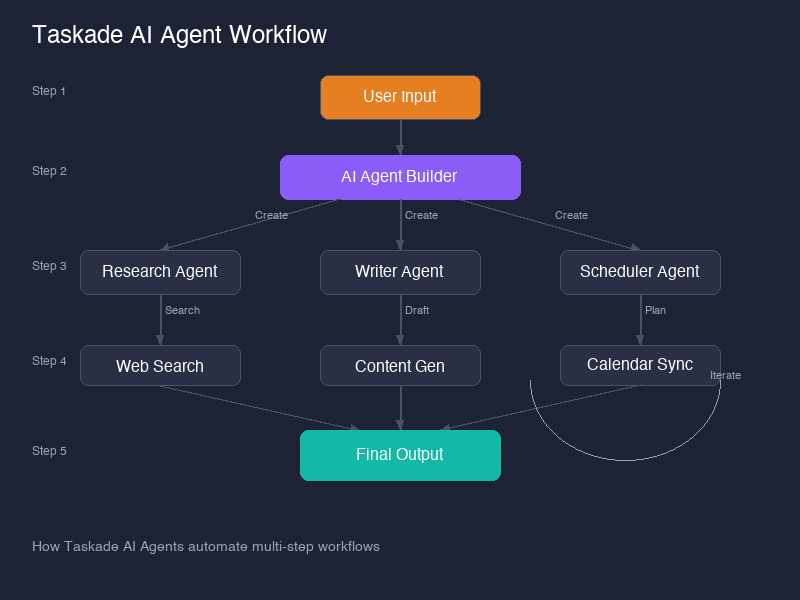
Each agent comes with access to 22+ built-in tools and can be extended with custom tool definitions and slash commands. Agents can:
- Create and update tasks and projects
- Send emails and notifications
- Trigger automations and workflows
- Search and analyze documents in your workspace
- Integrate with 100+ external services
- Coordinate with other agents in multi-agent teams
The Agent Builder lets you create custom agents trained on your specific data. You upload documents, connect data sources, and define the agent's role, personality, and capabilities. The agent then inherits what Taskade calls Workspace DNA — an understanding of your organizational context, terminology, and processes.
What makes this meaningful is persistent memory. When you have a conversation with a Taskade agent, that conversation is saved with full context. The next time you interact with the agent, it remembers what you discussed, what decisions were made, and what actions were taken. This eliminates the "starting from scratch" problem that plagues most AI chat interfaces.
For teams that coordinate multiple AI agents, Taskade supports multi-agent orchestration — assigning specialized agents to different roles (research, writing, project management) and letting them collaborate on complex workflows. If you are running a content operation, this is the kind of thing that turns a 3-hour research process into a 30-minute review.
If the concept of AI agents working autonomously on business tasks sounds familiar, it is because this is the direction the entire industry is heading. We wrote about how we built a company run by 14 AI agents — the core idea of agents doing real work, not just suggesting, is central to how we operate at Effloow.
Deployment options add flexibility. Agents can operate internally within your workspace, or you can deploy them externally — as embedded chatbots on your website, public-facing assistants, or customer support bots with branded interfaces. This turns Taskade from a productivity tool into a lightweight AI deployment platform.
Genesis: The No-Code App Builder
Genesis is Taskade's boldest feature and one that no competitor in the productivity space currently matches. It is a no-code AI app builder that transforms natural language prompts into complete, deployable web applications — typically within 2 to 15 minutes.
This is not code generation. Genesis creates what Taskade calls "living systems" — applications with responsive UIs, structured databases, embedded AI agents, and automated workflows. You describe what you need, select your preferred AI model, and Genesis builds it.
The categories of apps you can build include:
- Client portals with project tracking and file sharing
- CRM systems with pipeline management
- Booking and scheduling apps
- Interactive learning platforms with AI tutors
- Invoice generators and expense trackers
- Landing pages and marketing sites
- AI chatbots with context-aware responses
Each app gets an instant live URL upon completion. Business plan subscribers can connect custom domains and apply white-label branding. Published Genesis apps run without consuming AI credits, which means your production applications can serve unlimited users at no additional cost beyond your subscription.
This is a significant development in the vibe coding movement — the idea that you describe software in plain language rather than writing code. While standalone tools like Bolt.new and Lovable generate code files that still need deployment, Genesis produces running applications with built-in data management and AI capabilities.
The practical limitation is complexity. Genesis works well for internal tools, simple client-facing apps, and prototypes. For applications requiring custom backend logic, complex integrations, or high-traffic scalability, you will still need a developer. But for the 80% of business tools that are fundamentally forms, dashboards, and workflows, Genesis is surprisingly capable.
Workflow Automation
Taskade offers 104 automation actions with conditional branching and looping. Automations can be triggered by events (a task status change, a form submission, a schedule, or a webhook), and they can interact with 100+ external services including Slack, HubSpot, Stripe, GitHub, Discord, and Microsoft Teams.
The automation builder is visual and relatively intuitive. You define trigger conditions, add action steps, and set up branching logic for different scenarios. For teams already using Zapier, Make, or n8n for workflow automation, Taskade's native automations can replace some of those external workflows — particularly the ones that involve data already living inside Taskade.
Where this connects to the broader platform is through AI agents. An automation can trigger an agent, which can reason about the data, make a decision, and trigger another automation. This creates feedback loops that are difficult to replicate with traditional trigger-action automation tools.
AI Model Access
Taskade provides access to 11+ frontier AI models from three providers: OpenAI (GPT-4 and later), Anthropic (Claude), and Google (Gemini). You can select different models per agent, which means you can assign Claude for nuanced writing tasks, GPT-4 for code generation, and Gemini for research — all within the same workspace.
This multi-model approach is a significant advantage over tools locked into a single AI provider. If you are comparing AI coding tools or AI writing assistants, having model choice built into your productivity platform saves you from maintaining separate subscriptions.
Taskade Pricing Breakdown: What You Actually Pay
Taskade's pricing model is one of its strongest selling points. While most productivity tools charge per seat — which gets expensive fast as your team grows — Taskade uses flat team pricing on its most popular plans.
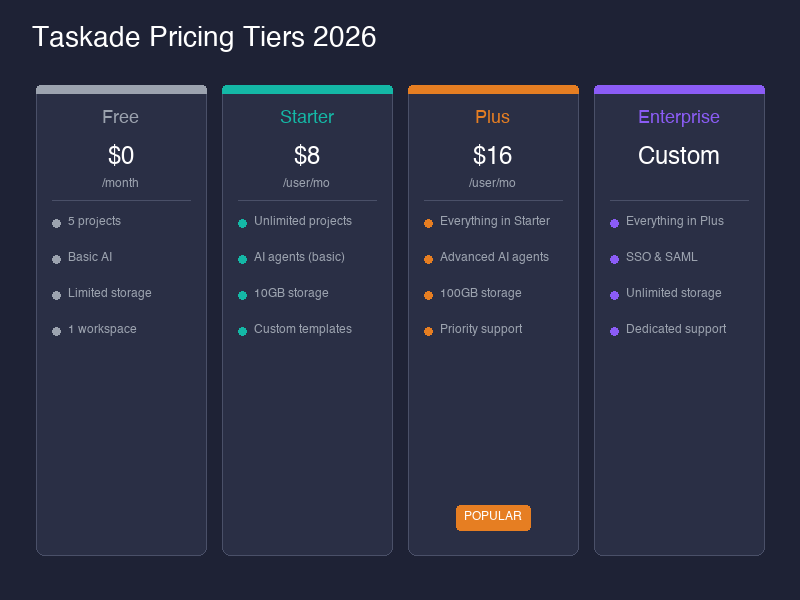
| Plan | Monthly | Annual (per month) | Users Included | AI Credits/Month | Agents |
|---|---|---|---|---|---|
| Free | $0 | $0 | 1 | 3,000 (one-time) | 1 |
| Starter | $8 | $6 | 3 | 10,000 | 3 |
| Pro | $20 | $16 | 10 | 50,000 | Unlimited |
| Business | $50 | $40 | Unlimited | 150,000 | Unlimited |
| Enterprise | Custom | Custom | Unlimited | Unlimited | Unlimited |
Source: taskade.com/pricing
The Math That Matters
The Pro plan at $16/month (billed annually) for up to 10 users is where the value proposition gets interesting. That is $1.60 per user per month. Compare that to:
- Notion AI: $10/user/month for AI features on top of the base plan
- ClickUp AI: $5/user/month add-on, plus base plan costs
- Monday AI: Available on Pro plan at $12/seat/month minimum
For a team of 10, Taskade Pro costs $16/month total. Notion with AI would cost approximately $100-200/month depending on the base plan. ClickUp with AI would be at least $170/month. The savings are substantial, especially for small teams and startups where every dollar of runway matters.
The Business plan at $40/month for unlimited users is remarkable for growing companies. Once your team exceeds 10 people, the per-user cost decreases with every new member.
AI Credits: What They Cover
AI credits are consumed when agents perform actions, generate content, or process requests. The Free plan's 3,000 credits are one-time (not monthly), which is enough to evaluate the platform but not enough for ongoing use. The Pro plan's 50,000 monthly credits support approximately 50 app generations or equivalent agent interactions — sufficient for most small team use cases.
Crucially, published Genesis apps do not consume credits. This means you can build and deploy internal tools or client-facing apps without worrying about ongoing AI costs for end users.
Additional Features by Plan
- Custom domains and branding: Business and Enterprise only
- 100+ integrations: Pro and above
- Unlimited automations: Pro and above
- Advanced admin controls: Business and above
- SSO and compliance: Enterprise
Taskade vs Notion AI: The Comparison Everyone Wants
This is the comparison most people searching for a Taskade review actually want. Both platforms combine project management with AI features, but they serve fundamentally different use cases.
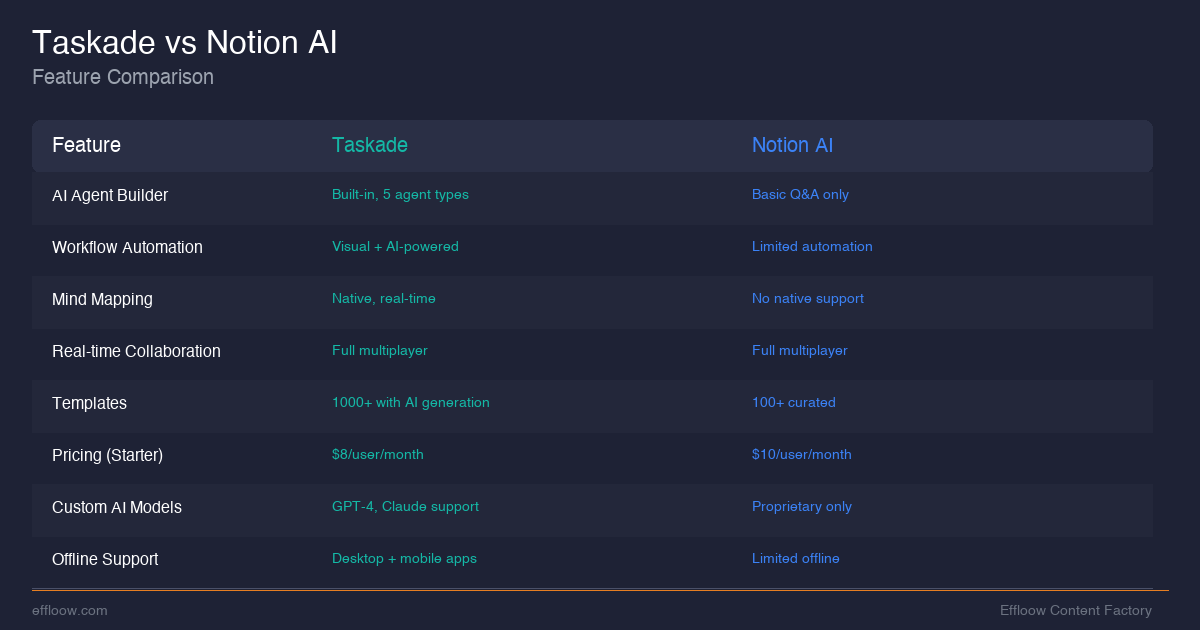
| Feature | Taskade | Notion AI |
|---|---|---|
| AI agents | Custom autonomous agents with 22+ tools, multi-agent teams | AI writing assistant and Q&A — no autonomous agents |
| Pricing model | Flat team pricing ($16/mo for 10 users) | Per-seat ($10-20/user/month) |
| App building | Genesis no-code builder with instant deployment | No equivalent feature |
| Automation | 104 native actions, 100+ integrations | Requires Zapier or Make for automation |
| AI models | 11+ models from OpenAI, Anthropic, Google | Anthropic-powered only |
| Database | Basic structured data with custom fields | Full relational databases with formulas |
| Documentation | Good for tasks, limited for deep wikis | Industry-leading wiki and documentation |
| Video calls | Built-in native video | No native video |
| Offline support | Limited | Better offline capabilities |
| Mobile app | Functional but commonly noted as clunky | More polished mobile experience |
| Templates | 1,000+ built-in templates | Community-driven template library |
When to Choose Taskade
Choose Taskade if you want AI agents that do things — not just write or answer questions. If your workflow involves recurring automations, if you need to build internal tools without a developer, or if flat team pricing matters for your budget. Taskade is the action-oriented choice.
When to Choose Notion
Choose Notion if your primary need is documentation, knowledge management, or relational databases. Notion's wiki capabilities, database formulas, and overall polish are still ahead of Taskade for content-heavy, documentation-first teams.
For a deeper comparison of AI-powered documentation tools, see our Notion AI custom agents developer guide.
Taskade vs ClickUp, Monday, and Asana
Beyond the Notion comparison, here is how Taskade stacks up against the traditional project management platforms:
| Feature | Taskade | ClickUp | Monday | Asana |
|---|---|---|---|---|
| AI agents | Autonomous, custom-built | ClickUp Brain (assistant) | Monday AI (assistant) | Asana Intelligence (assistant) |
| Price (10 users) | $16/mo total | $170+/mo | $120+/mo | $130+/mo |
| App builder | Genesis (no-code) | None | None | None |
| Automation | 104 actions, native | Advanced, mature | Visual builder | Rules-based |
| Video calls | Built-in | None native | None native | None native |
| Gantt charts | Included all plans | Paid plans | Paid plans | Premium+ |
| Learning curve | Low-Medium | High | Medium | Medium |
Taskade wins decisively on price and AI depth. ClickUp wins on project management maturity and advanced feature set. Monday wins on ease of use for non-technical teams. Asana wins on enterprise workflow management.
The honest take: if your team's primary need is traditional project management at scale — resource allocation, workload management, complex dependencies — ClickUp or Asana are more mature choices. If you want a lighter, AI-first workspace where agents and automations do the heavy lifting, Taskade is the stronger pick.
Who Should Use Taskade?
Ideal Users
- Small teams (2-10 people) who need project management + AI without paying per-seat enterprise prices
- Solopreneurs and freelancers who want AI agents handling recurring workflows
- Startups building internal tools quickly with Genesis instead of hiring developers
- Content teams using AI agents for research, drafting, and editorial workflows
- Agencies managing multiple client projects with embedded AI chatbots
- Remote teams who benefit from built-in video calls and real-time collaboration
Who Should Look Elsewhere
- Enterprise teams needing advanced compliance, audit trails, and deeply customizable permissions (consider Asana or Monday Enterprise)
- Documentation-first teams where wiki quality matters more than AI agents (choose Notion)
- Developer teams needing issue tracking, CI/CD integration, and code review workflows (use Linear, Jira, or GitHub Projects)
- Teams already invested in a mature PM tool with extensive integrations and custom workflows they do not want to rebuild
- AI agents that actually work — autonomous teammates with persistent memory, custom tools, and multi-agent coordination
- Flat team pricing — $16/month for 10 users is exceptional value in the productivity space
- Genesis app builder creates deployable web apps from prompts, a unique capability no competitor offers
- Multi-model AI access with 11+ models from OpenAI, Anthropic, and Google in a single platform
- All-in-one workspace — project management, docs, AI agents, video calls, and automation
- 8 project views including mind map and org chart that most competitors lack
- Mobile app is clunky compared to Notion or ClickUp mobile apps
- No relational databases, formulas, or the depth of Notion databases
- Limited offline support — not ideal for teams frequently working without internet
- Smaller ecosystem with fewer community integrations and third-party extensions
- Genesis limitations — complex applications still require real development
- Free plan is restrictive — 3,000 one-time credits barely enough to evaluate AI features
Taskade Pros and Cons: The Honest Assessment
Pros
- AI agents that actually work — Not chatbots, but autonomous teammates with persistent memory, custom tools, and multi-agent coordination
- Flat team pricing — $16/month for 10 users is genuinely exceptional value in the productivity space
- Genesis app builder — Building deployable web apps from prompts is a unique capability no direct competitor offers
- Multi-model AI access — Choice of 11+ models from OpenAI, Anthropic, and Google within a single platform
- All-in-one workspace — Project management, docs, AI agents, video calls, and automation in a single tool
- 8 project views — Including mind map and org chart that most competitors lack
- 1,000+ templates — Extensive library for fast project setup
- Cross-platform — Available on every major platform including Linux and browser extensions
Cons
- Mobile app needs improvement — Commonly reported as clunky compared to Notion or ClickUp mobile apps
- Database features are basic — No relational databases, formulas, or the depth of Notion databases
- Offline support is limited — Not ideal for teams frequently working without internet
- Smaller ecosystem — Fewer community integrations and third-party extensions compared to Notion or ClickUp
- Documentation depth — Wiki and knowledge base capabilities are functional but not best-in-class
- Genesis limitations — While impressive for simple apps, complex applications still require real development
- Free plan is restrictive — 3,000 one-time credits and 1 agent are barely enough to evaluate the AI features properly
- Relatively younger platform — Less battle-tested at enterprise scale compared to established PM tools
Is Taskade Worth It in 2026?
For the right team, Taskade offers the best value proposition in the AI productivity space right now. The combination of autonomous AI agents, flat team pricing, and a no-code app builder creates a package that no single competitor matches.
The platform is not perfect. The mobile experience needs work, the database features lag behind Notion, and enterprise teams with complex compliance requirements should look at more established options. But for small-to-medium teams that want AI to do real work — not just generate text — Taskade is worth serious evaluation.
If you are building a team of AI agents for your business, Taskade is one of the most accessible entry points. You do not need to set up infrastructure, write code, or stitch together multiple tools. The agents, the workspace, and the automation layer are all in one place.
Frequently Asked Questions
Is Taskade free?
Yes. Taskade offers a Free plan with 3,000 one-time AI credits, 1 AI agent, and 3 live Genesis apps. It is enough to explore the interface and basic features, but you will need a paid plan for meaningful AI usage.
How much does Taskade cost per user?
Taskade uses flat team pricing, not per-user pricing. The Pro plan costs $16/month (billed annually) for up to 10 users — that is $1.60 per user. The Business plan costs $40/month for unlimited users. Source: taskade.com/pricing.
Is Taskade safe and secure?
Taskade offers standard cloud security practices. Enterprise plans include SSO integration and advanced admin controls. SOC 2 compliance is referenced for enterprise customers. For most small-to-medium teams, the security posture is adequate, though organizations with strict compliance requirements should contact Taskade's sales team for detailed security documentation.
What is Taskade Genesis?
Genesis is Taskade's no-code AI app builder. You describe the application you want in plain language, and Genesis builds a complete web application with a responsive UI, structured database, embedded AI agents, and automated workflows — typically within 2 to 15 minutes. Published apps get instant live URLs and do not consume AI credits.
How does Taskade compare to Notion?
Taskade wins on AI agents (autonomous vs. assistant-only), pricing (flat vs. per-seat), and app building (Genesis vs. nothing). Notion wins on databases (relational vs. basic), documentation (industry-leading wiki), and mobile experience. Choose Taskade for AI-first action; choose Notion for documentation-first knowledge management.
Can Taskade replace ClickUp?
For small teams focused on AI-powered workflows, yes. Taskade covers task management, collaboration, and automation at a fraction of the cost. For large teams needing advanced project management features — resource allocation, workload management, custom dashboards, time tracking — ClickUp remains more capable.
What are Taskade AI agents?
Taskade AI agents are autonomous digital teammates that can reason through problems, execute multi-step workflows, and take real action within your workspace. They come with 22+ built-in tools, persistent memory across conversations, and can be customized with your own data and tool definitions. Unlike simple chatbots, they create tasks, update projects, send emails, and coordinate with other agents.
What AI models does Taskade use?
Taskade provides access to 11+ AI models from OpenAI (GPT-4 and newer), Anthropic (Claude), and Google (Gemini). You can select different models per agent, allowing you to match model strengths to specific tasks.
How do I create a custom AI agent in Taskade?
Use the Agent Builder: define your agent's role and personality, upload relevant documents or connect data sources for training, configure built-in and custom tools, and deploy. The agent inherits Workspace DNA — your organizational context and terminology — automatically.
Does Taskade work offline?
Taskade has limited offline support through its desktop and mobile apps. You can view and edit existing content offline, but AI features and real-time collaboration require an internet connection. If offline access is critical for your workflow, Notion currently offers a more robust offline experience.
Can I build apps with Taskade?
Yes, through Genesis. You can build CRM systems, client portals, booking apps, dashboards, chatbots, landing pages, and more — all from natural language prompts. Published apps receive instant live URLs and serve unlimited users without consuming your AI credits.
Is Taskade good for remote teams?
Yes. Built-in video calls, real-time collaboration, cursor tracking, and presence indicators make Taskade well-suited for remote work. The AI agents can handle async workflows — summarizing conversations, updating project statuses, and routing tasks — which reduces the coordination overhead that remote teams typically face.
Final Verdict
Rating: 4.2 / 5
Taskade is the most ambitious productivity platform in 2026. No other tool in this category offers autonomous AI agents, a no-code app builder, multi-model AI access, and flat team pricing in a single package. The vision is clear: a workspace where AI agents are teammates, not features.
The execution is not flawless. Mobile needs work, databases are basic, and the platform is still maturing compared to decade-old incumbents. But for teams that want to move fast, build tools without developers, and let AI agents handle the repetitive work — Taskade is the best option available at this price point.
Start with the Free plan to explore the interface. When you are ready for real AI agent workflows, the Pro plan at $16/month for your entire team is where the value kicks in.
Taskade is the most ambitious productivity platform in 2026 — no other tool in this category offers autonomous AI agents, a no-code app builder, multi-model AI access, and flat team pricing in a single package. The mobile app and database features need work, but for small-to-medium teams that want AI to do real work rather than just generate text, Taskade offers the best value proposition available at $16/month for 10 users. Rating: 4.2 / 5.
Need content like this
for your blog?
We run AI-powered technical blogs. Start with a free 3-article pilot.