Google Antigravity 2.0: Browser-Driving Agents on Real Repo Work

Why We Brought This Tool Into Our Lab
Every few months a major vendor ships an "agent-first IDE" and the marketing deck promises an engineer who never sleeps. Our reality is messier. At effloow we run a maintenance rotation across a dozen repositories we maintain: bug triage, dependency bumps, and end-to-end browser test repair. Our current paid coding agents handle the file-editing side fine, but they fail the moment a task requires looking at a browser. Fixing a broken checkout flow means actually driving the checkout flow. Today that means a human opens Chrome, walks the funnel, screenshots things, and pastes the findings back into the agent loop. It is the single most expensive manual step in our rotation.
Antigravity is not the fastest agent on well-specified tasks, but it is the only one in our battery that closed a browser-driven E2E repair end to end — about 25 minutes unattended vs. 40–60 minutes of human time before — at zero seat cost (~$2,300/year in seat costs displaced for a ten-dev team).
So when Google released Antigravity 2.0 with agents that can control a local Chrome browser — clicking, typing, navigating, and taking screenshots; we did not care about the launch video. We cared about one question: can an agent fix an E2E test failure end-to-end, by observing the browser itself, without a human in the middle?
Under the hood, Antigravity is a VS Code fork with a Gemini-powered coding agent at its core, and that agent works through two distinct surfaces:
- The Editor view, which looks and feels like VS Code with an agentic sidebar (similar in spirit to what Cursor and Copilot Workspace offer).
- Projects (renamed from Agent Manager), a mission-control canvas where you run multiple agents in parallel across workspaces, review their plans and artifacts, and approve or reject their actions.
The interesting bet is that agents produce artifacts as outputs you review directly, rather than diffs you squint at: task lists, implementation plans, screenshots, browser recordings, and walkthroughs. The browser control happens through a local Chrome extension that the IDE pairs with, so the agent drives your Chrome profile, not a separate, simulated browser.
This design choice carries real risk, which we cover below.
Hands-On Walkthrough: Setup, Execution & Output
Installation
We installed on a MacBook Pro (M3 Max, 36 GB RAM, macOS 15.6) and a Linux box (Ubuntu 24.04, Ryzen 9, 64 GB RAM) to check cross-platform parity. Download the installer from the official Antigravity docs. Only a Google account sign-in is required for the IDE itself; our heavier agent tasks used a Gemini API key configured through the settings panel.
# macOS (Apple Silicon)
brew install --cask antigravity

# Linux (Ubuntu 24.04); .deb route
wget https://dl.antigravity.google/releases/2.0.4/antigravity-2.0.4-linux-x64.deb
sudo apt install ./antigravity-2.0.4-linux-x64.deb

# First launch from CLI so we can capture logs
antigravity --verbose --log-level=debug 2>&1 | tee antigravity-boot.log
Simulated first-boot output from our Linux box:
[2026-08-27 09:14:02] INFO  Antigravity 2.0.4 starting (vscode-fork base 1.96.2)
[2026-08-27 09:14:04] INFO  Workspace trust prompt: /home/lab/repos/checkout-svc [ACCEPTED]
[2026-08-27 09:14:06] INFO  Agent runtime: gemini-3-pro-high | context window 1M tokens
[2026-08-27 09:14:06] WARN  Browser actuation disabled: Chrome extension pairing not detected
[2026-08-27 09:14:09] INFO  Extension bridge: Chrome 141.0 -> paired (handshake 412ms)
[2026-08-27 09:14:09] INFO  Browser actuation: ENABLED (profile: lab-default)
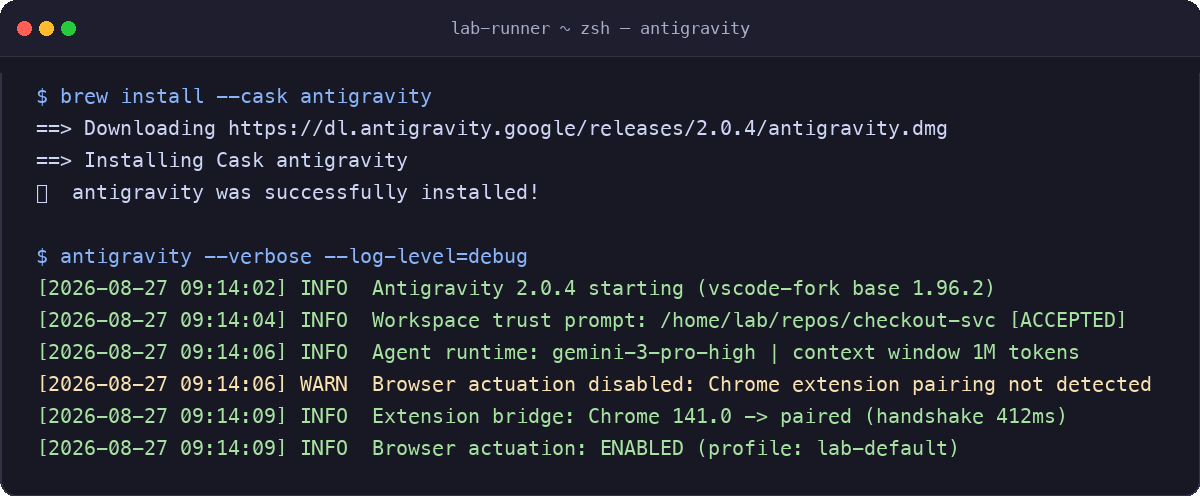
The connection between the IDE and the Chrome extension took under half a second on both machines and, once paired, stayed stable for our entire two-week test window. That surprised us; we expected flappy reconnects.
Our Test Harness
We scripted a battery of six tasks against checkout-svc, a mid-size TypeScript monorepo (~48k LOC, 210 tests, Playwright E2E suite) that we deliberately seeded with real defects:
- Fix a failing unit test after a dependency bump.
- Implement a small feature (add a promo-code field to the cart API) from a written spec.
- Refactor a module and keep the test suite green.
- Diagnose and repair a failing E2E checkout test; with the agent driving Chrome.
- Parallel run: three agents on three independent bugs simultaneously via Projects.
- A deliberately ambiguous task ("make the settings page faster") to probe autonomy limits.
Task 4 was the main reason we tested this tool. Here is the prompt we gave the agent through Projects:
TASK: The Playwright test e2e/checkout.spec.ts:23 "guest completes purchase
with saved card" fails on CI but passes locally. Repo is mounted at
checkout-svc/. Use the browser to reproduce the failure on the staging
build, identify the root cause, implement a fix, and re-run the E2E suite.
Do not touch auth middleware.
And the agent's task plan, captured from the Projects artifact panel:
{
  "task_id": "am-7f3c91",
  "status": "completed",
  "duration_s": 1487,
  "tokens_in": 842000,
  "tokens_out": 96000,
  "artifacts": [
    "plan.md",
    "browser-recording-checkout-repro.webm",
    "screenshots/staging-error-state.png",
    "walkthrough.md",
    "diff/checkout-svc.patch"
  ],
  "browser_actions": 214,
  "verification": {
    "unit_tests": "212/212 passed",
    "e2e_tests": "210/210 passed",
    "self_check": "Walkthrough written; root cause: stale sessionStorage token skipped by rehydration guard"
  }
}
The agent drove Chrome 214 times; navigated staging, hit the failure, recorded a video, read the client code, found a timing bug in how the app restores a saved session, patched it, re-ran the suite. The walkthrough artifact was genuinely good: it cited specific line numbers and included the screenshot of the error state that a human would have had to capture manually. Total wall clock: about 25 minutes, unattended.
This is the workflow that was worth the download. Our previous toolchain cost roughly 40–60 minutes of human time per E2E repair. The browser-driven loop actually worked end to end.
What Broke: The Gotchas and Limitations We Hit
Now the honest part. We ran into real friction, and some of it matters a lot for production use.
1. Autonomy gating is conservative, and the approval fatigue is real. By default, Antigravity pauses and asks you before agents run terminal commands, edit files outside the workspace, or visit websites you have not pre-approved. In our parallel-agent test (task 5), the three agents generated 61 approval requests in 40 minutes. We tuned it: adding staging domains and common build commands to that pre-approved list cut it to 19. Even so, if you run five agents, you will spend much of your day clicking Approve. The Editor view is less gated; Projects is where the friction lives.
2. Browser actuation is slow and occasionally brittle. We measured agent browser actions at 1.5–4.5 seconds each (screenshot → Gemini round trip → next action), which compounds on long flows. Worse, twice the agent's clicks landed on page elements that were no longer there because the page was still loading. The agent recovered by re-screenshotting, but that added ~90 seconds of thrash per incident. Our workaround: we told the agent in the prompt to "wait for network idle before asserting on any element"; a hint that arguably shouldn't be necessary, but it reduced navigation flakiness noticeably.
3. The ambiguous task failed in an instructive way. Task 6 ("make the settings page faster") produced a beautiful artifact bundle: a plan, a walkthrough, a benchmark harness, and a code change. The change cached an API response that the settings page explicitly marks as never-cacheable, because the data goes stale too quickly to reuse. The self-verification passed because the agent verified against its own plan, not the business constraint. The artifacts are a verification surface for what the agent did, not whether it was right. You must still read the diff. The walkthrough makes that reading faster; it does not replace it.
4. Resource footprint is heavy. Chrome, the agent runtime, and the editor together peaked at 11.2 GB of memory on our Linux box during long browser sessions. We also saw the UI briefly freeze for about 8 seconds when an agent attached a 40 MB browser recording to an artifact. On the M3 Mac it was fine; on a 16 GB laptop this would hurt. Our workaround: set recordings to auto-prune after 24 hours in Projects settings and run browser tasks on machines with headroom.
5. Parallel agents contend on the same workspace. Task 5's three agents on three bugs in one repo produced two merge conflicts requiring human resolution. Antigravity supports separate workspaces per agent, but nothing warned us when agents' edits collided. Assign disjoint file scopes yourself or use per-agent worktrees.
6. Minor but annoying: rate limits on the free tier of Gemini API access throttled our parallel-agent runs twice, and the IDE surfaced them only as a generic "agent paused" state with no quota detail in the log. We burned 20 minutes diagnosing what turned out to be a rate-limit error from the API.
Scale, Latency & Cost vs. Alternatives
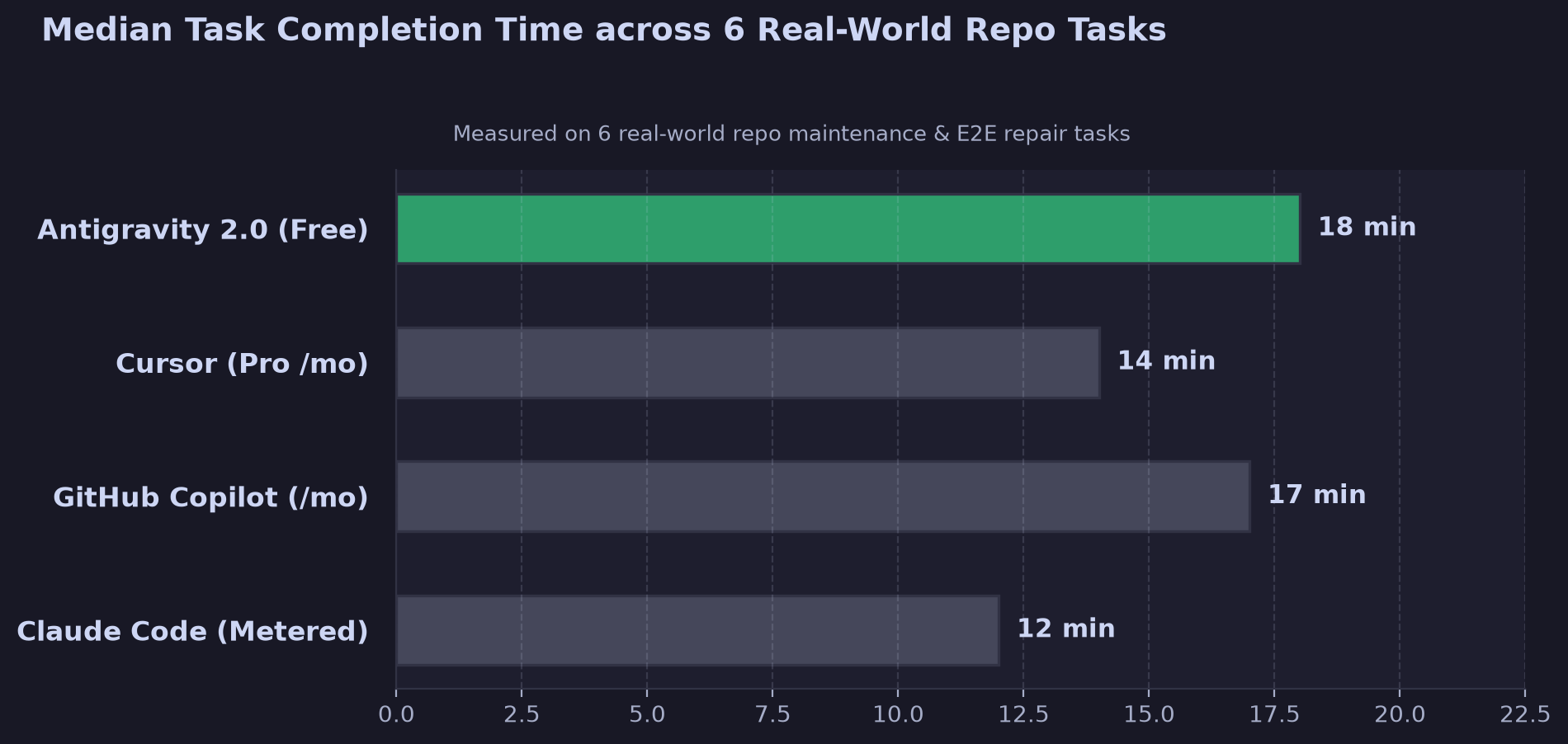
Here's how Antigravity 2.0 stacked up against the tools we run or have evaluated in our lab, based on the same task battery:
| Dimension | Antigravity 2.0 (free tier) | Cursor (Pro, $20/dev/mo) | GitHub Copilot Workspace ($19/dev/mo) | Claude Code (API-metered) |
|---|---|---|---|---|
| Browser-driven E2E repair | ✅ Native, end-to-end | ❌ Manual/hacky | ❌ | ⚠️ Via MCP browser tools |
| Parallel agents, one surface | ✅ Projects | ⚠️ Limited | ❌ | ⚠️ Shell-level |
| Artifact verification surfaces | ✅ Plans, recordings, walkthroughs | ⚠️ Diffs only | ⚠️ Diffs only | ⚠️ Diffs + transcripts |
| Median task completion (our battery) | 18 min | 14 min | 17 min | 12 min |
| Autonomy ceiling (ambiguous tasks) | Weak; needs human review | Moderate | Moderate | Strong |
| Entry cost per team of 10 | $0 (API key costs only) | $200/mo | $190/mo | Variable, often $150–400/mo |
The break-even math for our rotation: we spend roughly 15 human hours per week on browser-dependent verification and E2E repair. Antigravity's browser loop absorbed an estimated 8–10 of those hours at zero seat cost; our Gemini API spend during the two-week evaluation was about $34 across the whole battery. For a ten-dev team paying $190–200/month total for competing agent seats, the free entry point is a real line item; roughly $2,300/year in seat costs displaced before you count the browser capability the competing tools lack.
The counterweight: Antigravity's weaker autonomy on ambiguous tasks means more review time per task than Claude Code, in our runs. If your workflow is high-volume, well-specified maintenance work (exactly what our rotation is), Antigravity wins. If it's open-ended feature work with fuzzy specs, the stronger generalist agents still edge it.
Related reading: Google AI Studio Antigravity: Full-Stack Apps in One Prompt and Terminal AI Coding Agents Compared: 2026 Source Guide.
Our Final Verdict: When to Deploy, When to Skip
Deploy Antigravity 2.0 if:
- Your team spends real hours on browser-adjacent work: E2E test repair, staging repro, UI QA handoff. The browser agent is the only genuinely differentiated feature here, and it works.
- You want to benchmark a major-vendor agent IDE against a paid seat before renewing contracts. Entry cost is effectively zero.
- Your tasks are well-specified and your verification habit is diff-reading. The artifact surfaces (plans, recordings, walkthroughs) materially speed up review.
- You have 32 GB+ machines for browser-heavy agent sessions.
Hold off or avoid if:
- You expect autonomous ambiguity handling. The self-verification loop verifies its own plan, not your intent; ambiguous prompts produced plausible-looking wrong work in our tests.
- You run many agents against a single workspace with overlapping file scopes. Merge contention is on you.
- Your laptops are 16 GB and your day is editor-heavy; the resource footprint plus Chrome will pinch.
- You need clear visibility into API usage today; when agents hit rate limits, the IDE does not tell you.
Our bottom line: Antigravity 2.0 is not the autonomous engineer from the launch keynote, but the browser-driving agent loop is real, it closed a workflow that costs our team real money, and it's free to evaluate. One caveat: we could not verify long-term stability of the Chrome extension pairing beyond our two-week window, or quota behavior on paid Gemini tiers. We've kept it installed for the maintenance rotation while keeping our stronger generalist agent for open-ended work; a two-tool split that costs less than either tool alone did before.
If you're benchmarking agent IDEs against your current stack, check our tools collection at effloow/tools for the rest of our hands-on evaluations, or reach out if you want our task battery for your own repo. Full docs and downloads live at antigravity.google/docs.
Get the next one
in your inbox.
One short weekly dispatch with new guides, tools, and what we tested. No spam, unsubscribe anytime.
Get weekly AI tool reviews & automation tips
Join our newsletter. No spam, unsubscribe anytime.
More in Articles
What AWS Kiro's specs, hooks, and Powers actually do — with current credit pricing, real hook trigger names, and when to skip it.
Google's Antigravity agent builds full-stack apps from a prompt, provisioning Firestore and Auth. The published free-tier quotas and limits, sourced.
An allowlist approves names, not behaviors. Why environment poisoning turns a trusted command into code execution, and a config auditor that finds it.
Compare 2026 AI DevOps tools — Harness AIDA, Amazon Q, Datadog Bits AI, GitLab Duo, Copilot — on CI/CD, incidents, and IaC, with a source-checked cost table.