Adding One Tool to Your Agent Wiped the Whole Prompt Cache
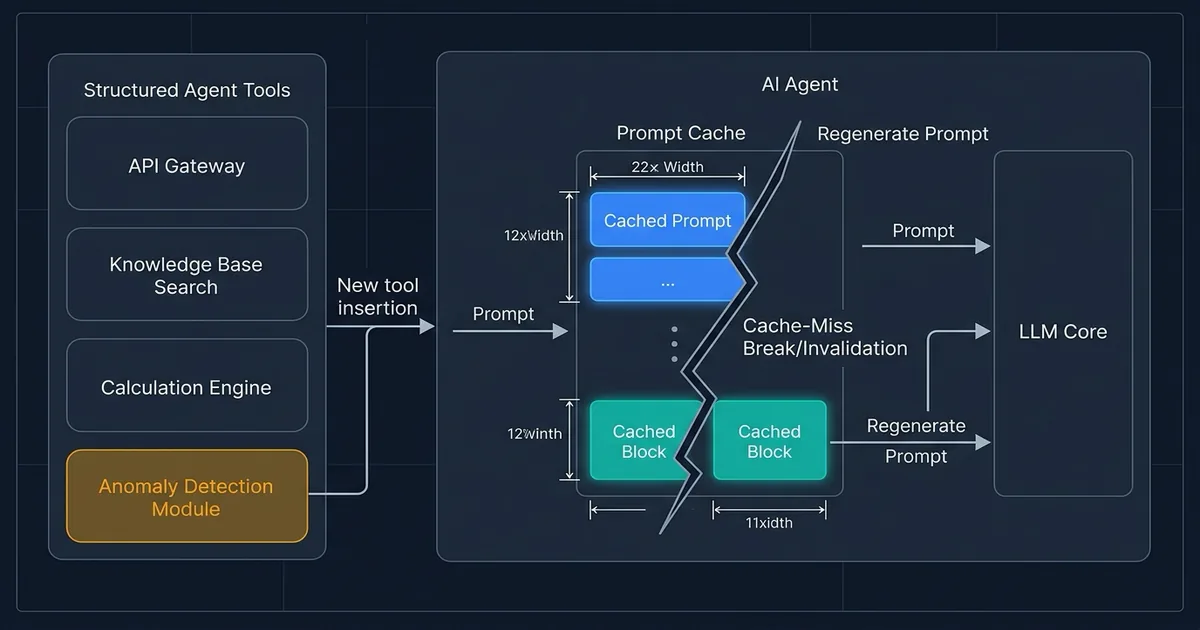
Picture the support assistant your team shipped six months ago. It answers order questions and checks shipments, and it can issue small refunds. Every request carries the same block of setup text: the house rules, plus a machine-readable menu of the actions the assistant is allowed to take.
That block never changes, so the model provider stores it and charges roughly a tenth of the usual rate to reuse it. This is prompt caching, and for most agent products it's the single largest discount on the bill. A January 2026 study across OpenAI, Anthropic and Google put the saving at 41–80% on long agent sessions.
Then a product manager asks for one more capability. An engineer adds it. Nothing breaks, latency looks normal, and six weeks later finance asks why the model line went up.
No error. No alert. Nothing in the logs. The discount just stops.
What we measured
Effloow Lab ran an OpenAI API check on 12 August 2026 against the Responses API on gpt-5.6-luna. The setup was deliberately boring: one fixed instruction paragraph, one fixed question, and a menu of 20 invented actions for a fictional retailer's fulfilment desk. No customer data, no real order system, nothing confidential.
Then we changed exactly one thing at a time and read back what the provider reported as reused from cache.
| ID | What changed | Nothing else changed? |
|---|---|---|
| A | Nothing. The baseline, run repeatedly | — |
| E | Restricted the assistant to 3 of the 20 actions using a per-request setting, leaving the menu itself untouched | Yes |
| B | Added a 21st action to the end of the menu | Yes |
| C | Deleted the 6th action from the middle | Yes |
| D | Swapped the position of two actions. No text changed at all | Yes |
| F | Changed one word inside one action's description | Yes |
We re-ran the untouched baseline between every mutation. That sounds like housekeeping. It's actually the whole experiment, because without it a zero could simply mean the cache had expired on its own. Interleaving is what makes the zeros mean something.
Seventeen calls, 29,338 tokens. Cheap enough to run monthly as a regression check, which is half the point.
What happened
The baseline behaved as advertised. Of 1,705 tokens of setup, 1,702 came back marked reused, on every single repeat. (The 3-token gap is the provider matching in blocks rather than token by token. Noise, not a finding.)
Then the mutations:
| Variant | Setup tokens | Reused from cache | Plain-language result |
|---|---|---|---|
| A — baseline | 1,705 | 1,702 | Full discount |
| E — restrict via setting | 1,705 | 1,702 | Full discount kept |
| B — append to the end | 1,787 | 0 | Discount gone |
| C — delete from middle | 1,621 | 0 | Discount gone |
| D — reorder only | 1,705 | 0 | Discount gone |
| F — one word reworded | 1,705 | 0 | Discount gone |
Four different edits. Four zeros. Not a reduced hit, not a partial match on the identical opening text. Zero.
Two of those deserve a second look.
Appending to the end was exactly as destructive as deleting from the middle. The intuition that new stuff at the bottom is safe doesn't hold here. In variant B, all 20 original descriptions were byte-identical and in the same order, and it bought nothing.
Reordering cost the full discount without changing a single character. Variant D sent the same 1,705 tokens, the same words, in a different sequence. That's the one that should worry you. An agent that assembles its action menu from a dictionary, a database query, or a set of plugin servers can reorder itself with nobody touching the code.
One variant survived. E restricted the model to 3 of the 20 actions through a per-request setting, left the menu itself alone, and kept all 1,702 tokens cached. It doesn't make the request smaller — it still bills the same 1,705 setup tokens as the baseline. It protects the price, not the size.
What a zero costs
A cache miss isn't merely the loss of a discount. The provider has to write the new setup into cache, and writing bills above the ordinary input rate. Our run confirmed that in the response data: every miss reported 1,702 tokens written to cache.
On OpenAI's published prices, the gap is wide. Reading cached setup on the cheapest tier costs $0.02 per million tokens. Writing it costs $0.25 per million. Same tokens, 12.5 times the price. Even measured against never caching at all ($0.20 per million), a cache-busting tool edit costs 1.25 times more than doing nothing clever.
The arithmetic below runs on those published prices for an assistant handling 10,000 requests a day that all share this setup block. It uses the 1,702 cacheable tokens the run actually measured, not the full 1,705, so you can redo it with your own figures. A worked example, not a bill we received.
| Model tier | Cached read | Cache write | Per day, all cached | Per day, all busted | 30-day gap |
|---|---|---|---|---|---|
| gpt-5.6-sol | $0.50/M | $6.25/M | $8.51 | $106.38 | $2,936 |
| gpt-5.6-terra | $0.20/M | $2.50/M | $3.40 | $42.55 | $1,175 |
| gpt-5.6-luna | $0.02/M | $0.25/M | $0.34 | $4.26 | $117 |
Those three tiers are OpenAI's capability ladder. Sol is the expensive one you reach for when the reasoning is hard; luna is the cheap one for routine traffic. If your assistant does anything difficult, read the sol row. Roughly $2,900 a month, on a setup block of only 1,705 tokens.
Now the caveat that keeps this honest. That last column is a ceiling, not a forecast. It assumes every request misses, and no real product is that broken. Your actual exposure is the gap multiplied by the share of traffic arriving with a changed menu. If a fifth of your requests rebuild the tool list, take a fifth: about $590 a month on sol. The number that decides your bill is that share, and in our experience most teams have never measured it, because nothing in the response tells them to look.
One more thing about scale. 1,705 tokens is small, and we kept it small so the experiment stayed cheap. A production assistant wired to several plugin servers carries a far larger action menu, and this cost scales in a straight line with that block. Double the menu, double the gap.
Can this survive your workflow?
The damage only lands if your action menu changes between requests. Some products never touch it. Others rebuild it constantly without realising. Check yourself against these:
- Order and fulfilment desks. If the assistant gains extra actions when an order crosses a value threshold, or loses the refund action outside business hours, your menu changes per request.
- Support ticket triage. Routing logic that hands billing tools to billing tickets and shipping tools to shipping tickets is the textbook version of this problem.
- CRM and internal automation. Menus assembled per user role, per team, or per permission tier change on nearly every call.
- Anything wired to plugin servers. If your action list is discovered at runtime from external servers rather than written down in your code, you don't control its order. A server that returns its actions in a different sequence after a restart can zero your discount with no deploy on your side.
- Billing and finance agents. These usually run on the most capable, most expensive tier, which is exactly where the gap above is widest.
If two or more describe your product, the fix is small and worth doing this quarter. If your assistant ships a fixed menu that changes only when you deploy, you're already fine, and the cost is one cache write per release.
Effloow packages this kind of check as a proof asset: one claim, one executed run, and the raw evidence behind it, in a form you can hand to your own finance or engineering team without asking them to trust us. If you want this measurement run against your agent's real setup block and your real traffic mix, talk to us about a Proof Studio run.
What to change on Monday
Three moves, cheapest first.
- Read the field. Log
cached_tokenson every call. You cannot price this problem until you know what share of your traffic misses, and that share is the whole number. - Freeze the menu. Declare the full toolkit once and stop rebuilding the array per request. If it comes from discovery, sort it deterministically and treat the result as a build artifact.
- Narrow per request, not per menu. Where you genuinely need different capabilities in different situations, restrict which tools the model may call instead of editing the list it sees.
When to use this, when to skip it
Use the restrict-per-request approach when your assistant needs different capabilities in different situations, your setup block runs over roughly a thousand tokens, and you send enough traffic for caching to engage at all.
Skip it when your menu genuinely never changes at runtime, or your setup block sits under the 1,024-token floor OpenAI documents for automatic caching, or your traffic is sparse enough that the cache expires between requests anyway. On this model family the cache lives to a 30-minute exact TTL that you set through prompt_cache_options.ttl, so sparse traffic gets you nothing regardless.
Don't assume it transfers between model versions. An independent write-up on DEV Community reports that dropping a tool behaves very differently across the GPT-5 family, retaining most of the cache on one version and none on a later one. We didn't reproduce that comparison and we're not restating its numbers as ours. Our gpt-5.6 result points the same direction, which makes the practical lesson simple: pin your model version, and re-measure when you move it.
Honest limits of this test
One model, one endpoint, one account, one day. This is a measurement, not a benchmark, and it says nothing about other providers.
One setup size, too. Whether the behaviour shifts with 50 or 200 actions in the menu is not something this run can tell you.
We tested the automatic caching path only. Newer explicit cache controls let you mark a boundary in the prompt by hand, and whether placing that boundary before the action menu changes any of this is an open question we haven't answered. We wrote about those controls separately in what GPT-5.6's explicit cache controls actually cost.
Single-turn only. Every call was one question, so long conversations remain untested.
Anthropic documents a beta capability that adds and removes tools mid-conversation on several Claude models while keeping the cache intact. Effloow has no Anthropic API credential configured, so we read that from the documentation and did not measure it.
The prices come from OpenAI's published pricing page. We did not measure a billed invoice.
What Effloow added
The vendor documentation already states that tool definitions and their ordering are part of the cached prefix, and it already recommends restricting tools per request instead of editing the menu. What it doesn't do is show you the failure at the level of individual edits, or tell you which intuitions are wrong.
Our contribution is the measured breakdown: four specific mutation types run against one fixed prefix with interleaved baseline re-checks, showing that appending to the end is no safer than deleting from the middle, and that a pure reorder with zero text change loses everything. Plus the cost arithmetic that turns a cached_tokens: 0 into a monthly figure, with the ceiling labelled as a ceiling. The full run, including raw per-call output, is published as the public lab note.
FAQ
Q: Does adding a tool at the end of the list really break the cache?
In our run, completely. Variant B kept all 20 original definitions byte-identical and in order, appended one new definition after them, and still reported zero reused tokens. The shared leading text produced no partial match.
Q: Is a cache miss just "no discount," or does it cost extra?
It costs extra. The provider bills the tokens it writes into cache above the ordinary input rate. On the tier we tested, that's $0.25 per million against $0.20 per million for plain uncached input, and $0.02 per million for a cache read.
Q: Will restricting tools per request also reduce my token bill?
No. Variant E billed exactly the same 1,705 setup tokens as the baseline. Every definition still travels to the model. The setting protects your cache discount and does nothing for context length. If context length is the constraint you're actually fighting, that's a different problem, and we cover the general toolkit in token optimization for production LLMs.
Q: How would I detect this in a system already running?
Log the reused-token count on every call and alert when it drops to zero on a request that should have hit a warm cache. It's one field in the response. Most teams never read it, which is precisely why this failure can run for months.
For your engineers
Environment. OpenAI Responses API (POST https://api.openai.com/v1/responses), model gpt-5.6-luna, run 2026-08-12T00:41:30Z. Script: scripts/tool-list-cache-probe.py. Every call passed through the repository's token budget guard before execution and recorded usage after.
Design. Fixed instructions string plus 20 synthetic function-tool definitions (1,705 input tokens total, deliberately verbose so the tools block alone clears the documented 1,024-token caching floor). Single user message, identical across all calls. Shared prompt_cache_key of effloow-toolchange-probe-v1. max_output_tokens: 48. Calls spaced roughly 2 seconds apart. Order: A1–A3 (cold plus two repeats), E1–E2, A4, B1–B2, A5, C1–C2, A6, D1–D2, F1–F2, A7.
Raw results. Reported as step / tool_count / input_tokens / cached_tokens:
A1_baseline_cold      20  1705     0   (cache_write_tokens: 1702)
A2_baseline_repeat    20  1705  1702
A3_baseline_repeat    20  1705  1702
E1_allowed_tools      20  1705  1702
E2_allowed_tools      20  1705  1702
A4_baseline_recheck   20  1705  1702
B1_append_tail        21  1787     0   (cache_write_tokens: 1784)
B2_append_tail        21  1787  1784
A5_baseline_recheck   20  1705  1702
C1_remove_middle      19  1621     0   (cache_write_tokens: 1618)
C2_remove_middle      19  1621  1618
A6_baseline_recheck   20  1705  1702
D1_reorder            20  1705     0   (cache_write_tokens: 1702)
D2_reorder            20  1705  1702
F1_edit_description   20  1705     0   (cache_write_tokens: 1702)
F2_edit_description   20  1705  1702
A7_baseline_recheck   20  1705  1702
Reading the control conditions. Every mutation's second call (B2, C2, D2, F2) hit its own cache, so the zeros are genuine prefix breaks rather than failed requests. Baseline re-checks A4 through A7 all returned 1,702, so no mutation evicted the baseline. Baseline and variants coexisted under one prompt_cache_key.
The mitigation, concretely. Declare the full toolkit in tools and never rebuild that array per request. Narrow capability with tool_choice: {type: "allowed_tools", mode: "auto", tools: [...]}. If your tool list is assembled from a dictionary, a database, or MCP server discovery, sort it deterministically before serialising, and treat the serialised array as a build artifact rather than something computed at request time. Variant D is the reason: order alone is enough. This mitigation covers runtime variation only — a genuinely new capability still means one cache write per deploy, which is the cost you should be paying.
Instrumentation. Read usage.input_tokens_details.cached_tokens and usage.input_tokens_details.cache_write_tokens on every response. A sustained cached_tokens: 0 on a warm path is the alert.
Reproduce it. python3 scripts/tool-list-cache-probe.py. The full note, command, design table and limitations sit at /lab-runs/openai-agent-tool-list-change-prompt-cache-proof-2026. Related measurement on cache retention windows: OpenAI's 24h prompt cache, measured.
Sources
- Prompt caching — OpenAI API docs — "Tool definitions, tool ordering, and structured output schemas contribute to the prompt prefix"; caching enabled automatically at 1,024 tokens or longer; 30-minute exact TTL via
prompt_cache_options.ttlon GPT-5.6 and later; keep thetoolsarray unchanged and useallowed_toolswhere supported. - Prompt Caching 201 — OpenAI Cookbook — tools are injected before developer instructions, so changing them invalidates the cache;
allowed_toolsrestricts callable tools "without changing the tools array and busting the cache." - OpenAI API pricing — gpt-5.6-luna $0.20 input / $0.02 cached / $0.25 cache writes / $1.20 output; terra $2.00 / $0.20 / $2.50 / $12.00; sol $5.00 / $0.50 / $6.25 / $30.00, per million tokens.
- Mid-conversation system messages and tool changes — Claude Platform docs — beta
tool_additionandtool_removalblocks that change the offered tool set between turns while preserving the cache, behind themid-conversation-tool-changes-2026-07-01header. Not tested here. - Don't Break the Cache: An Evaluation of Prompt Caching for Long-Horizon Agentic Tasks — Lumer et al., January 2026; measures prompt caching across OpenAI, Anthropic and Google on over 500 agent sessions from DeepResearch Bench, reporting 41–80% cost reduction and 13–31% faster time to first token when caching holds, across prompt sizes of 500 to 50,000 tokens and 3 to 50 tool calls.
- Drop one tool from your request: one GPT-5 version keeps 76% of it cached, another keeps nothing — independent report of version-dependent behaviour in the GPT-5 family. Referenced as context; not reproduced by this run.
Sell an AI tool with a claim like this?
We run your tool's claim in a sandbox and hand you proof assets your buyers can check — recorded runs, failures included, and a sales-ready claim table.
More in Articles
GPT-5.6 added explicit prompt cache controls and quietly took the 24-hour cache away. We ran the API and measured what that swap costs.
OpenAI now keeps prompt caches for 24h by default on GPT-5.5. We ran the API to see when the 90% discount actually shows up, and when it doesn't.
Step-by-step guide to self-hosting RAGFlow v0.25 with Docker Compose — deep document understanding, chunking strategies, MCP server, and the Python SDK.
Compare the top AI agent frameworks in 2026 — LangGraph, CrewAI, OpenAI Agents SDK, and more — with code examples and use-case recommendations.
Tools you can use
Model your LLM traffic shape against cache TTL to find your real hit rate, monthly savings, and the break-even hit rate below which prompt caching costs more.
Estimate token counts and API costs for your prompts across Claude, GPT-4o, and Gemini models. Real-time, client-side, no data sent to servers.
Build tool-calling schemas visually. Define a function and typed parameters, get ready-to-paste tool blocks for OpenAI Chat Completions, OpenAI Responses, and Anthropic Messages. 100% client-side.