Docker Model Runner vs Ollama: Local AI Deployment Compared 2026
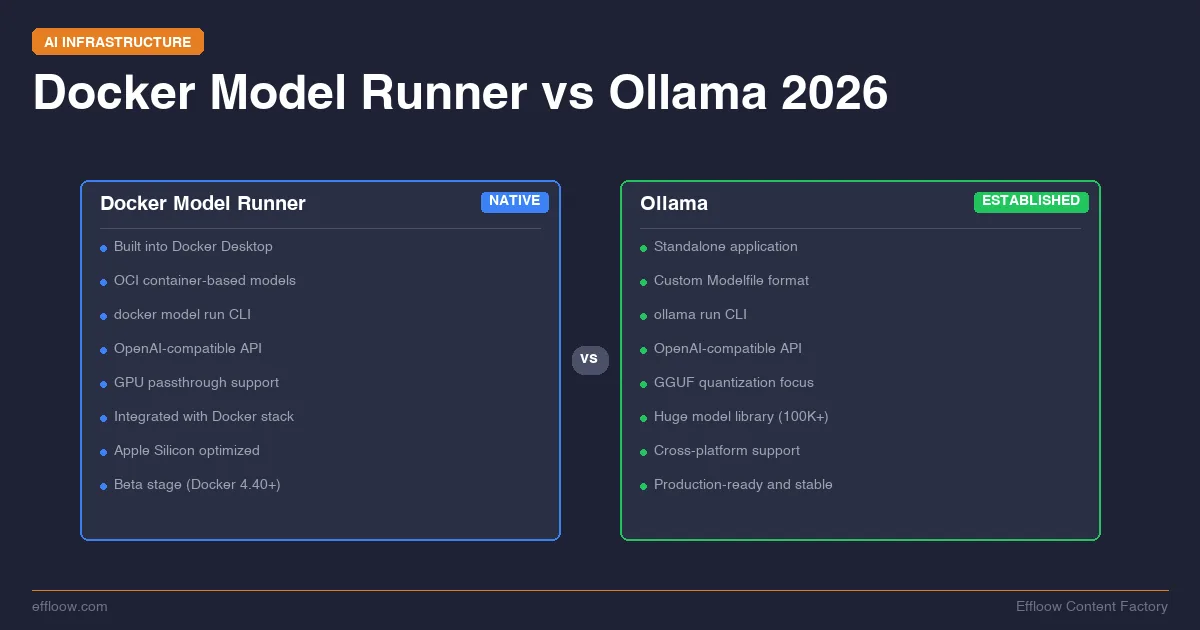
Docker entered the local AI space. If you are already running models with Ollama, you are now looking at a second option that speaks the same language — literally the same OpenAI-compatible API — but comes from the company that standardized how the world ships software.
Docker Model Runner (DMR) is available with Docker Desktop for macOS 4.40+, Docker Desktop for Windows 4.41+, and Docker Engine. Docker's docs describe it as a way to pull, run, and serve models from Docker Hub, OCI-compatible registries, or Hugging Face while exposing OpenAI-compatible and Ollama-compatible APIs. It can package GGUF and Safetensors files as OCI artifacts and integrate with Docker Compose. Ollama, meanwhile, remains a widely used standalone local model runner with a native CLI, local REST API, OpenAI-compatible endpoints, Modelfiles, and import paths for GGUF and supported Safetensors workflows.
This is a source-verified decision guide, not a hands-on benchmark. Effloow did not run a saved Docker Model Runner versus Ollama lab for this article. Where the article shows commands, treat them as documented setup patterns to verify in your own environment.
If you are new to running models locally, start with our Ollama + Open WebUI setup guide first. If you already have Ollama running and want to know whether Docker Model Runner is worth adding to your stack, keep reading.
Primary sources checked on 2026-06-08: Docker Model Runner docs, Docker Model Runner API reference, Docker Model Runner inference engines, Docker Compose models reference, Ollama OpenAI compatibility docs, Ollama import docs, and Ollama GPU docs.
What Is Docker Model Runner
Docker Model Runner is Docker's native solution for running AI models locally. It is not a container that runs a model inside it — it runs models directly on the host using llama.cpp, with no container overhead.
How It Works
DMR treats AI models as first-class Docker primitives, similar to images and containers. Models are stored as OCI (Open Container Initiative) artifacts, the same standard that Docker uses for container images. This means models can be pushed to and pulled from Docker Hub, private registries, or any OCI-compliant registry.
When you pull a model with docker model pull, it downloads the GGUF weights and stores them locally. When you run inference, llama.cpp loads the model into memory, runs the computation on your CPU or GPU, and returns results through an OpenAI-compatible API on port 12434. Before pulling a large model, our LLM VRAM calculator estimates whether it will fit your GPU or unified memory.
Key Features
- OpenAI-compatible API on
localhost:12434. Any tool that speaks to the OpenAI API can point at Docker Model Runner instead. - Ollama-compatible API as well — existing Ollama integrations can switch endpoints without code changes.
- Docker Compose integration. Define models as services in your
docker-compose.yml. Docker pulls and starts the model automatically duringdocker compose up. - Multiple inference engines. llama.cpp (default, broad hardware support), vLLM (high-throughput production workloads), and Diffusers (image generation).
- GPU acceleration. Metal (Apple Silicon), CUDA (NVIDIA), and Vulkan (AMD, Intel, NVIDIA).
- Lazy loading. Models load into memory only when a request arrives and unload when idle, freeing resources automatically.
- Metrics endpoint at
/metricsfor monitoring performance and resource usage.
System Requirements
- Docker Desktop 4.40+ on macOS, Docker Desktop 4.41+ on Windows, or Docker Engine on Linux
- 8 GB RAM minimum, 16 GB recommended
- Optional: Apple Silicon (Metal), NVIDIA GPU (CUDA), or Vulkan-compatible GPU
Ollama Recap — The Current Standard
If you have been running models locally in the past two years, you may already know Ollama. It launched in 2023 and became one of the most common developer entry points for local LLM management.
Ollama provides a simple CLI (ollama pull, ollama run), an OpenAI-compatible API on port 11434, and a growing library of pre-configured models. It supports GGUF, Safetensors, and custom Modelfiles for fine-tuned configurations.
We covered Ollama setup in depth in our Ollama + Open WebUI guide. If you are new to local AI, start there before comparing runners.
What Makes Ollama the Default
- Large public model library. Browse current models at
ollama.com/library. Exact monthly download volume is [DATA NOT AVAILABLE] in the saved evidence for this article. - Custom model import paths. Ollama documents Modelfile-based imports for GGUF files and supported Safetensors workflows
- Custom Modelfiles. Create model configurations with specific system prompts, parameters, and adapters
- Ecosystem integration. LangChain, LlamaIndex, Spring AI, Open WebUI, Continue.dev, Cursor, and Aider all document or expose Ollama-oriented configuration paths
- Cross-platform. macOS, Linux, Windows. Works on Apple Silicon, NVIDIA GPUs, and CPU-only setups
Installation and Setup Comparison
Installing Docker Model Runner
If you already have Docker Desktop installed, DMR may already be available. Check:
docker model version
If the command is not recognized, enable it in Docker Desktop:
- Open Docker Desktop
- Go to Settings → AI
- Enable Docker Model Runner
- Optionally enable GPU-backend inference if you have a supported GPU
On Linux with Docker Engine, DMR is included when installed from Docker's official repositories. The TCP endpoint is enabled by default on port 12434.
Pull your first model:
docker model pull ai/smollm2
Run it:
docker model run ai/smollm2 "Explain Docker Model Runner in one sentence"
The API is immediately available at http://localhost:12434.
Installing Ollama
Download from ollama.com or install via command line:
# macOS / Linux
curl -fsSL https://ollama.com/install.sh | sh

# Verify
ollama --version
Pull and run a model:
ollama pull llama3.2
ollama run llama3.2 "Explain Ollama in one sentence"
The API is available at http://localhost:11434.
Setup Comparison Summary
| Aspect | Docker Model Runner | Ollama |
|---|---|---|
| Install method | Included in Docker Desktop / Engine | Standalone installer or script |
| Prerequisite | Docker Desktop or Engine | None |
| Default port | 12434 | 11434 |
| Enable step | Settings → AI → Enable | None (runs on install) |
| Time to first model | ~2 minutes (if Docker installed) | ~2 minutes |
| Model format | GGUF (OCI artifacts) | GGUF, Safetensors, custom Modelfiles |
Bottom line: Ollama is usually the simpler setup path from scratch because it does not require Docker. Docker Model Runner is convenient when Docker is already part of your workflow because it can be enabled inside Docker Desktop or installed with Docker Engine.
Model Catalog and Availability
Docker Model Runner: Docker Hub AI Models
DMR pulls models from Docker Hub under the ai/ namespace. Available models include:
ai/llama3.2— Meta Llama 3.2ai/smollm2— SmolLM2ai/mistral— Mistral AIai/phi4— Microsoft Phi 4ai/qwen2.5— Alibaba Qwen 2.5ai/deepseek-r1-distill-llama— DeepSeek R1 distilledai/mistral-nemo— Mistral Nemoai/qwq— QwQ reasoning model
Models are stored as OCI artifacts, meaning they follow the same distribution standard as Docker container images. You can also pull models from Hugging Face.
# List downloaded models
docker model ls

# Pull a specific quantization
docker model pull ai/llama3.2:3B-Q4_K_M

# Remove a model
docker model rm ai/llama3.2
Ollama: The Broader Library
Ollama's model library is significantly larger. Beyond the major model families, it includes:
- Community-uploaded models and fine-tunes
- Custom Modelfiles for configuring system prompts, temperature, and stop tokens
- Support for importing raw GGUF files and Safetensors models
- Quantization variants for most models
# List downloaded models
ollama list

# Pull a specific model
ollama pull llama3.2

# Create a custom model from a Modelfile
ollama create my-assistant -f Modelfile

# Remove a model
ollama rm llama3.2
Catalog Comparison
| Aspect | Docker Model Runner | Ollama |
|---|---|---|
| Model source | Docker Hub (ai/ namespace), Hugging Face |
ollama.com/library, Hugging Face, GGUF import |
| Number of models | Curated selection (~20+ families) | Hundreds of models + community uploads |
| Custom models | Import GGUF files | Modelfiles, GGUF import, Safetensors |
| Storage format | OCI artifacts | Ollama-managed local storage |
| Registry support | Any OCI registry | Ollama registry only |
Bottom line: Ollama is strong when you want its library and Modelfile workflow. Docker Model Runner is strong when standardized distribution matters — OCI artifacts mean you can use container registry infrastructure for model management.
Performance: Startup, Inference, and Memory
Performance between Docker Model Runner and Ollama is largely comparable — both use llama.cpp as the default inference engine. The architectural differences are in how they manage model loading and memory, not in raw inference speed.
Inference Speed
This guide does not claim a measured speed winner. Docker documents llama.cpp as Docker Model Runner's default engine, and Ollama is also commonly used as a local runner for GGUF-style model workflows. For the same model, quantization, hardware, context size, and batch behavior, the engine and configuration details matter more than the product label. Any precise token-per-second comparison should come from a reproducible local benchmark, which this guide does not provide.
Model Loading
Docker Model Runner uses lazy loading — models are loaded into memory only when the first request arrives and unloaded when idle. This is resource-efficient but means the first request after idle has higher latency.
Ollama keeps models loaded in memory by default (configurable with OLLAMA_KEEP_ALIVE). This can reduce reloads for recently used models but uses more memory while the model remains loaded.
Memory Usage
Both tools have similar peak memory usage for the same model since they use the same inference engine. The difference is in idle behavior:
- DMR: Unloads models when idle → lower idle memory usage
- Ollama: Keeps models loaded for a configurable period → fewer reloads, higher idle memory while loaded
Inference Engine Options
Docker Model Runner offers a key advantage here: multiple inference engines.
| Engine | Best For | Supported Platforms |
|---|---|---|
| llama.cpp (default) | General use, broad hardware | CPU, Metal, CUDA, Vulkan |
| vLLM | High-throughput production | Linux x86_64 with NVIDIA CUDA in the current Docker docs |
| Diffusers | Image generation | CPU, CUDA |
Ollama uses its own optimized fork of llama.cpp exclusively.
Docker documents three Model Runner engines: llama.cpp for broad local development, vLLM for high-throughput text generation, and Diffusers for image generation. That is the safe takeaway here. Exact throughput depends on model, backend, GPU, driver, quantization, and request shape.
Bottom line: Do not assume a speed winner without running your own benchmark. Docker Model Runner's vLLM option is relevant when throughput and batching matter more than the simplest local setup.
GPU Acceleration
Both tools support GPU acceleration, but the implementation and configuration differ.
Docker Model Runner GPU Support
DMR supports three GPU backends:
- Metal (Apple Silicon M1/M2/M3/M4) — enabled by default, no configuration needed
- CUDA (NVIDIA GPUs) — requires NVIDIA Container Runtime
- Vulkan (where supported by the installed Docker Model Runner backend)
Enable GPU in Docker Desktop: Settings → AI → GPU-backend inference.
On Linux with NVIDIA GPUs:
# Verify GPU is detected
docker model status

# Pull and run with GPU acceleration
docker model pull ai/smollm2
docker model run ai/smollm2 "Test GPU inference"
Ollama GPU Support
Ollama detects and uses available GPUs automatically:
- Metal (Apple Silicon) — automatic, no configuration
- CUDA (NVIDIA) — automatic if NVIDIA drivers are installed
- ROCm (AMD GPUs on Linux) — supported with ROCm drivers
# Check GPU detection
ollama ps

# Force CPU-only mode if needed
OLLAMA_NO_GPU=1 ollama serve
GPU Comparison
| Feature | Docker Model Runner | Ollama |
|---|---|---|
| Apple Silicon Metal | Yes (automatic) | Yes (automatic) |
| NVIDIA CUDA | Yes (needs runtime) | Yes (automatic) |
| AMD ROCm | Via Vulkan | Yes (Linux) |
| Intel GPUs | Via Vulkan | No |
| Vulkan support | Yes | No |
| Configuration | Settings toggle | Automatic detection |
Bottom line: Ollama's GPU setup is often simpler for supported hardware. Docker Model Runner's documented backend options are worth checking when Vulkan or Docker Engine GPU workflows matter.
Integration Ecosystem
This is where the comparison gets practical. If your AI coding tools cannot connect to the model runner, the performance benchmarks do not matter. Both tools serve as local backends for terminal AI coding agents like Claude Code, Codex CLI, Gemini CLI, and Aider.
IDE and Tool Compatibility
Both Docker Model Runner and Ollama provide OpenAI-compatible APIs, which means most tools can connect to either. Here is the integration status for popular AI developer tools:
| Tool | Docker Model Runner | Ollama |
|---|---|---|
| Continue.dev | Yes (OpenAI provider) | Yes (native Ollama provider) |
| Cursor | Yes (OpenAI endpoint) | Yes (native) |
| Aider | Yes (via env vars) | Yes (native) |
| Open WebUI | Yes (OpenAI connection) | Yes (native, recommended) |
| LangChain | Yes (OpenAI SDK) | Yes (native Ollama SDK) |
| LlamaIndex | Yes (OpenAI SDK) | Yes (native Ollama SDK) |
| Spring AI | Yes (native support) | Yes (native support) |
Docker Model Runner: Continue.dev Configuration
Edit ~/.continue/config.json:
{
  "models": [
    {
      "title": "SmolLM2 (Docker)",
      "provider": "openai",
      "model": "ai/smollm2",
      "apiBase": "http://localhost:12434/engines/v1"
    }
  ]
}
Docker Model Runner: Aider Configuration
export OPENAI_API_BASE=http://localhost:12434/engines/v1
export OPENAI_API_KEY=anything
aider --model ai/smollm2
Ollama: Continue.dev Configuration
{
  "models": [
    {
      "title": "Llama 3.2 (Ollama)",
      "provider": "ollama",
      "model": "llama3.2"
    }
  ]
}
Docker Compose Integration (DMR Exclusive)
This is Docker Model Runner's biggest ecosystem differentiator. You can define AI models as services in docker-compose.yml:
services:
  model:
    provider:
      type: model
      options:
        model: ai/smollm2

  app:
    build: .
    environment:
      - MODEL_URL=${MODEL_MODEL_URL}
      - MODEL_NAME=${MODEL_MODEL_NAME}
    depends_on:
      - model
When you run docker compose up, Docker automatically pulls the model, starts inference, and injects connection details (MODEL_MODEL_URL, MODEL_MODEL_NAME) into your application container. No manual setup, no glue code.
For containers that need to reach Docker Model Runner directly, add:
services:
  app:
    extra_hosts:
      - "model-runner.docker.internal:host-gateway"
Then access the API at http://model-runner.docker.internal:12434/.
Bottom line: Ollama has many native integrations. Docker Model Runner works through OpenAI-compatible and Ollama-compatible APIs, which often requires endpoint configuration. The Docker Compose integration is the standout feature for teams building Docker-based AI applications.
GPU Server Deployment on Hetzner
For models that exceed your laptop's capabilities, you need a GPU server. We covered GPU setup in detail in our Hetzner Cloud GPU guide, but verify current instance availability and pricing before purchase.
Ollama on Hetzner
For a remote GPU server, Ollama's documented setup remains straightforward. SSH into the server and run:
curl -fsSL https://ollama.com/install.sh | sh

# Verify GPU detection
nvidia-smi
ollama ps

# Pull a large model
ollama pull llama3.2

# Expose API (bind to all interfaces)
OLLAMA_HOST=0.0.0.0 ollama serve
The API is available on port 11434. See our Ollama + Open WebUI guide for adding a browser interface.
Docker Model Runner on Hetzner
Install Docker Engine on your Hetzner server:
# Install Docker Engine
curl -fsSL https://get.docker.com | sh

# Add NVIDIA Container Toolkit
distribution=$(. /etc/os-release;echo $ID$VERSION_ID)
curl -fsSL https://nvidia.github.io/libnvidia-container/gpgkey | sudo gpg --dearmor -o /usr/share/keyrings/nvidia-container-toolkit-keyring.gpg
curl -s -L https://nvidia.github.io/libnvidia-container/$distribution/libnvidia-container.list | \
  sed 's#deb https://#deb [signed-by=/usr/share/keyrings/nvidia-container-toolkit-keyring.gpg] https://#g' | \
  sudo tee /etc/apt/sources.list.d/nvidia-container-toolkit.list
sudo apt-get update && sudo apt-get install -y nvidia-container-toolkit
sudo nvidia-ctk runtime configure --runtime=docker
sudo systemctl restart docker

# Verify DMR is available
docker model version
docker model pull ai/smollm2
The TCP endpoint on Linux is enabled by default on port 12434.
Server Deployment Comparison
| Aspect | Docker Model Runner | Ollama |
|---|---|---|
| Install complexity (GPU) | Higher (Docker + NVIDIA toolkit) | Lower (single script) |
| Remote API exposure | Port 12434 (TCP by default on Linux) | Port 11434 (configurable) |
| Reverse proxy setup | Standard Docker networking | Standard Nginx/Caddy |
| Docker Compose apps | Native integration | Needs network configuration |
| Community deployment guides | Growing | Extensive |
Bottom line: Ollama can be simpler to deploy on a GPU server. Docker Model Runner fits better when the same server already runs Docker-based services and you want models integrated into your Compose stack. If you are managing multiple Docker services on a single server, a self-hosted PaaS like Coolify or Dokploy can simplify container orchestration. For detailed GPU setup context, see our self-hosting guide.
When to Use Which: Decision Framework
Based on the current documentation and integration model, here is the practical decision framework.
Choose Docker Model Runner When
- You already use Docker in development. DMR is a natural extension of your existing workflow. No new tools to install or manage.
- You are building Docker Compose applications. The native model-as-a-service integration in Compose is Docker Model Runner's clearest differentiator. Define a model, run
docker compose up, and your app receives model connection details through injected environment variables. - You want OCI-standard model distribution. If you use private registries (Harbor, ECR, GCR) for container images, you can use the same infrastructure for AI models.
- You need to evaluate Vulkan-backed workflows. Docker documents Vulkan among Model Runner backend options; confirm support for your exact OS, driver, and Docker release.
- You want to evaluate production inference with vLLM. DMR's vLLM option is relevant for throughput-oriented deployments, but validate it against your workload.
Choose Ollama When
- You want the simplest path to running local models. One install script, one command to pull, one command to run. No prerequisites.
- You need the broadest model library. Ollama's registry has more models, more quantization options, and community uploads.
- You use custom Modelfiles. Ollama's Modelfile system for creating customized model configurations has no DMR equivalent.
- Your tools have native Ollama support. Continue.dev, Cursor, Aider, Open WebUI — all have dedicated Ollama providers that are more polished than their OpenAI-compatible fallbacks.
- You deploy to GPU servers. Ollama's single-script install with automatic GPU detection is harder to beat for server deployment.
Choose Both When
Docker Model Runner and Ollama can coexist. They use different ports (12434 vs 11434), different model storage, and different processes. Running both is a valid strategy:
- Use Ollama for interactive development, Open WebUI chat, and quick model experimentation
- Use Docker Model Runner for application development where models are part of your Docker Compose stack
This is especially useful if you are transitioning from Ollama to Docker Model Runner — run both while you migrate your workflows.
Running Both Side by Side
Here is a practical setup that runs both tools concurrently with the same model:
Step 1: Install Both
# Ollama (if not already installed)
curl -fsSL https://ollama.com/install.sh | sh

# Docker Model Runner (enable in Docker Desktop Settings → AI)
docker model version
Step 2: Pull the Same Model on Both
ollama pull llama3.2
docker model pull ai/smollm2
Step 3: Verify Both APIs
# Test Ollama API
curl http://localhost:11434/v1/chat/completions \
  -H "Content-Type: application/json" \
  -d '{
    "model": "llama3.2",
    "messages": [{"role": "user", "content": "Hello from Ollama"}]
  }'

# Test Docker Model Runner API
curl http://localhost:12434/engines/v1/chat/completions \
  -H "Content-Type: application/json" \
  -d '{
    "model": "ai/smollm2",
    "messages": [{"role": "user", "content": "Hello from Docker"}]
  }'
Step 4: Configure Tools for Either
Point your AI coding tools at whichever backend you prefer:
- Continue.dev: Use
ollamaprovider for port 11434,openaiprovider with customapiBasefor port 12434 - Aider: Set
OPENAI_API_BASEto either endpoint - Open WebUI: Add both as connections — Ollama native + OpenAI-compatible for DMR
Resource Considerations
Running both tools simultaneously doubles your disk usage for shared models (they store models separately). Memory usage depends on which models are actively loaded — DMR's lazy unloading helps here.
If disk space is a concern, pick one as your primary and use the other only for specific workflows.
Quick Reference: Command Comparison
| Task | Docker Model Runner | Ollama |
|---|---|---|
| Check version | docker model version |
ollama --version |
| Pull a model | docker model pull ai/smollm2 |
ollama pull llama3.2 |
| Run interactively | docker model run ai/smollm2 "prompt" |
ollama run llama3.2 |
| List models | docker model ls |
ollama list |
| Remove a model | docker model rm ai/smollm2 |
ollama rm llama3.2 |
| Check status | docker model status |
ollama ps |
| API endpoint | localhost:12434 |
localhost:11434 |
| API format | OpenAI + Ollama compatible | OpenAI + Ollama native |
| Model source | ai/ on Docker Hub |
ollama.com/library |
Final Verdict
Docker Model Runner is not an Ollama replacement — it is an Ollama alternative for Docker-native workflows. The tools solve the same problem (running LLMs locally) with different integration philosophies.
If Docker is already central to your development workflow, Docker Model Runner is a strong candidate. Compose integration, OCI-standard model distribution, and multi-engine support (llama.cpp + vLLM + Diffusers) add flexibility for Docker-based applications.
If you want a simple standalone local AI tool, Ollama remains a strong default candidate. Its CLI, model library, Modelfile workflow, and many native integrations make it easy to adopt.
If you maintain both exploratory and Docker-native local AI workflows, running both can be reasonable. They coexist without conflict, serve different parts of a workflow, and provide broad compatibility with local AI tooling. For a full breakdown of tool costs, see our AI coding tools pricing comparison, and verify current pricing before purchase.
What Effloow Added
Both tools have good official docs, but the docs describe each tool in isolation — neither tells you which one fits your workflow. We built the head-to-head the vendors don't:
- A same-task comparison across setup, model catalog, performance, GPU acceleration, and integrations, drawn from official Docker and Ollama references rather than one tool's marketing.
- A decision framework keyed to how you actually work (Docker-central vs standalone vs both), so the choice maps to your setup instead of a feature checklist.
- A side-by-side "run both" walkthrough showing they coexist without port or runtime conflicts — the question most comparisons skip.
The value is the cross-tool synthesis and the decision rule, not a re-list of each tool's features.
Related Guides
Building a local AI stack involves more than choosing a model runner. Here are the guides that complete the picture:
- Ollama + Open WebUI Self-Hosting Guide — Set up Ollama with a browser-based chat interface from scratch
- Hetzner Cloud GPU Server Guide — Deploy larger models on affordable GPU servers
- Self-Host Your Dev Stack Under $20/Month — The broader self-hosting strategy including AI infrastructure
- Free AI Coding Tools 2026 — Both Docker Model Runner and Ollama serve as free backends for AI coding tools
- Terminal AI Coding Agents Compared 2026 — Claude Code, Codex CLI, Gemini CLI, and Aider all support local model backends
- Build Your First RAG App with Python + LlamaIndex — Use local embedding models from Ollama or Docker Model Runner to power a RAG pipeline
- AI Model Comparison Tool — Compare model specs, pricing, and capabilities side-by-side
Get the next one
in your inbox.
One short weekly dispatch with new guides, tools, and what we tested. No spam, unsubscribe anytime.
Get weekly AI tool reviews & automation tips
Join our newsletter. No spam, unsubscribe anytime.
More in Articles
Run Gemma 4 locally with Ollama and Open WebUI: all five model sizes compared against Google's own model card, plus VRAM sizing and setup steps.
Self-host Ollama with Open WebUI in 2026. Source-backed setup paths, failure checks, use/skip guidance, and cost-planning links.
Self-host n8n with Docker Compose and build AI workflows. Source-verified guide covering setup, Ollama integration, agents, and deployment.
Self-host Dify with Docker Compose: install steps, Ollama integration, a RAG chatbot, and the upgrade changes that break a self-hosted instance.
Tools you can use
Generate a CPU-only local Compose file with reviewed image references, explicit concurrency controls and a required secret placeholder.
Paste any docker run command and instantly get an equivalent docker-compose.yml service block. Supports ports, volumes, environment variables, restart policies, networks, GPUs, healthchecks, and more.
Free calculator: compare the monthly cost of an LLM API against self-hosting on your own GPU, and find the token volume where self-hosting starts to win.